
Learn how outstream video ads work, where they appear and how they expand video advertising beyond traditional video inventory.
Video advertising has traditionally depended on video content. If a website didn't have a video player, running video campaigns was almost impossible, and with the rapid scale of video ad spending, this reliance on video environments is a significant constraint. In fact, global digital video advertising is projected to reach $188.76 billion in 2026, with short-form video formats driving some of the fastest growth in the market.
Outstream video ads eliminate the constraints around traditional video ads. Instead of relying on existing video content, they allow video advertising to appear directly within articles, content feeds and other non-video environments. This gives advertisers access to a much larger pool of inventory while enabling publishers to generate video ad revenue without producing or hosting video content.
What Are Outstream Video Ads?
Unlike instream ads, they do not require existing video content.
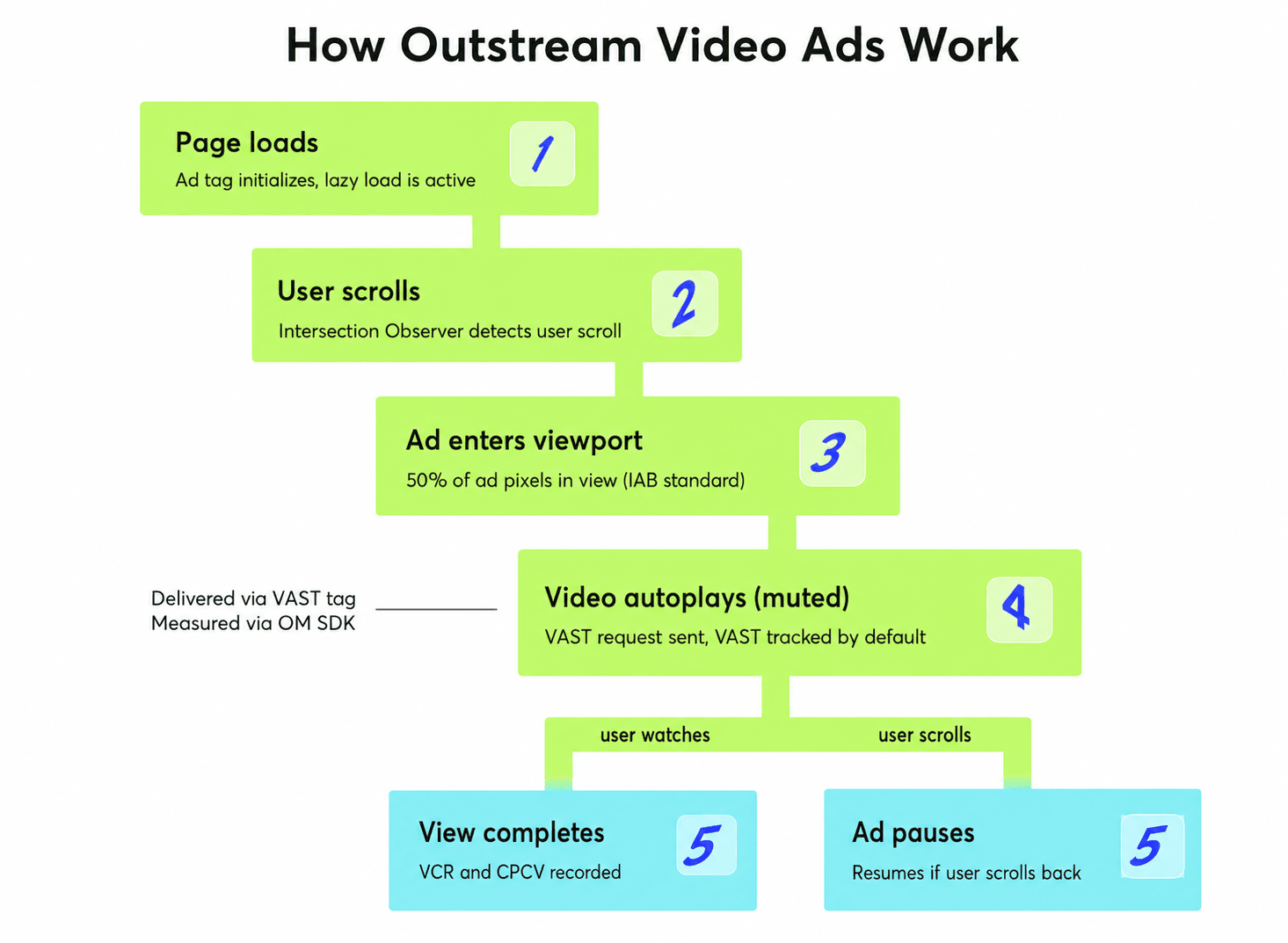
Most outstream ads start playing automatically when they enter the user's viewport and pause when scrolled out of view. They are muted by default, allowing users to choose whether to enable sound or keep muted.
Because outstream ads create their own ad unit rather than relying on a video player, they give advertisers access to a much wider range of websites and apps than traditional video formats.

How Outstream Video Ads Work
User activity triggers outstream ads; for example, when a user scrolls to a specific position on a page, the ad unit becomes visible and the video starts playing automatically.
In most cases, the ad pauses when it leaves the visible area of the screen and resumes if the user scrolls back. This helps improve viewability and ensures advertisers pay for impressions on a video that is actually visible.
A typical outstream ad experience looks something like this:
- A user opens an article, feed or app.
- The video ad appears when it enters the viewport.
- The video starts playing automatically, usually without sound.
- The ad pauses if the user scrolls away.
- The user can continue watching, interact with the ad or keep browsing.
Technical Components Behind Outstream Ads
Under the hood, outstream ads rely on a few industry standards:
- VAST (Video Ad Serving Template) is an IAB standard that tells an ad player which video ad to load and how to track key events such as impressions, starts, completions and clicks. Most modern outstream video solutions support VAST 4.x or later.
- OMID (Open Measurement SDK) is the industry standard for measuring ad viewability and verifying ad delivery across web, mobile web and in-app environments. It replaced VPAID, which was deprecated by the IAB Tech Lab due to security and performance concerns.
- Lazy loading is a technique that loads an ad only when it is close to entering the user's visible screen area. This helps reduce unnecessary bandwidth usage and improves the accuracy of viewable impression measurement.
- Intersection Observer API is a browser feature that allows an ad unit to detect when it becomes visible on the screen or moves out of view. Outstream video ads commonly use it to automatically start playback when visible and pause when no longer in view.
Why Advertisers Use Outstream Video Ads
Outstream ads help advertisers extend the reach of video campaigns. Instead of competing for a limited number of placements within video content, brands can run video ads across articles, feeds and apps on publishers who have never hosted a video player.
One of the biggest advantages is scale. Outstream opens access to the vast majority of the open web that instream simply cannot reach. For example, news sites, food blogs and finance forums typically don’t carry video content, but all of them can serve outstream ads.
Outstream can support different campaign objectives depending on how it is used:
- For awareness, it helps reach users early in the funnel across content-rich environments.
- For consideration, it reinforces messaging as users research topics related to the product.
- For traffic generation, it can drive clicks through a clear call to action in the video or companion banner.
- For retargeting, it can serve video creatives to users who have visited the site but have not converted.
For most advertisers, outstream works best as an additional channel, one that reaches users who may never encounter the brand within traditional video environments like YouTube or streaming platforms.
Main Types of Outstream Video Ads
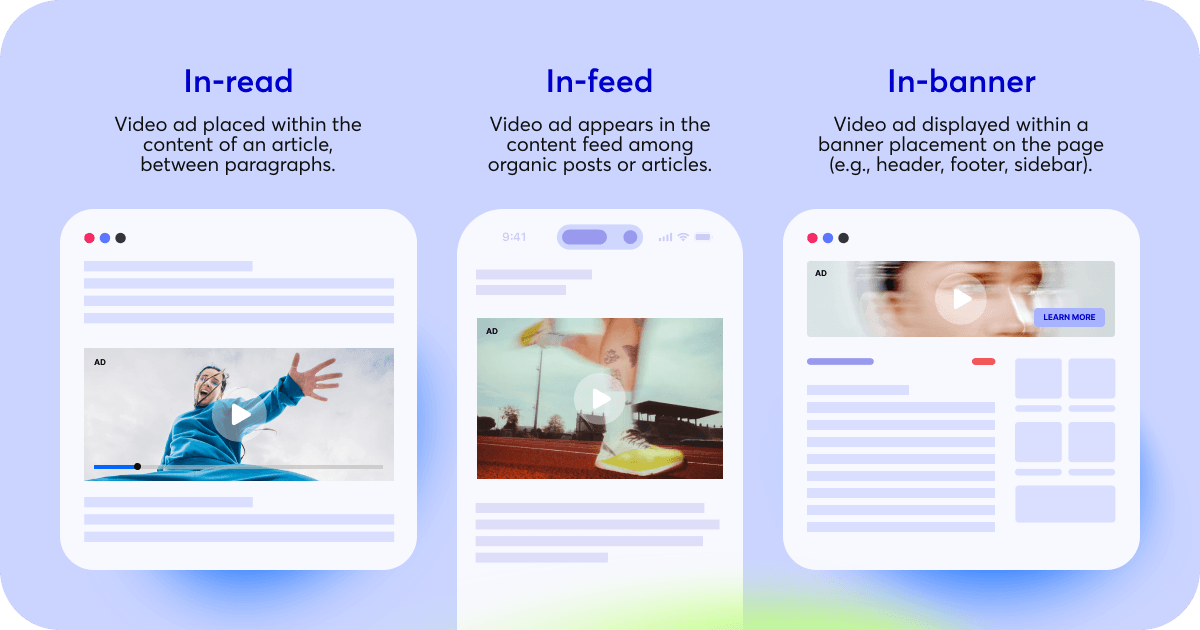
Outstream advertising includes several formats that differ mainly in where the video appears and how users interact with it.
| Format | Description | Common use cases |
|---|---|---|
| In-read | Appears between paragraphs of an article and plays when it enters the viewport | News sites, blogs, editorial content |
| In-feed | Appears within content feeds alongside articles or posts | Content platforms, social-style feeds |
| In-banner | Video is served inside a display ad placement | Websites with existing banner inventory |
In-read works best for brand awareness and storytelling because users are more likely to engage with longer narratives while reading.
In-feed suits discovery and consideration campaigns, where the creative blends naturally into a content stream and feels less like an interruption.
In-banner is the most practical entry point for reach and retargeting, fitting into existing display inventory without any page redesign.
The right format depends on website structure, user behavior and campaign objectives. Many advertisers test multiple placements to identify which environment delivers the strongest engagement and viewability.
Other Formats Commonly Used Alongside Outstream
Some publishers and ad platforms support additional video ad formats that are often used alongside outstream placements:
- Sticky video ads remain visible while users scroll through a page, helping increase viewability. However, if the unit is large or poorly positioned, it can obscure content and frustrate users.
- Overlay ads appear on top of existing page content and can be dismissed by the user. They are effective when the close button is clearly visible, but they are problematic when it is hidden or delayed.
- Interstitial ads are shown between pieces of content, often during navigation or app interactions. They can deliver high completion rates but should be used sparingly to avoid high bounce rates.
- Rewarded video ads offer users access to content, features or in-app benefits in exchange for watching a video. It is the most user-friendly of these formats because the exchange is voluntary.
These formats tend to generate stronger engagement than standard in-read or in-feed placements, but if implemented without care, they carry a higher risk of disrupting the user experience. Publishers using them should monitor bounce rate and session depth alongside standard video metrics.
Outstream vs. Instream Video Ads
Although both formats use video creatives, they appear in different environments and serve slightly different purposes.
| Feature | Outstream ads | Instream ads |
|---|---|---|
| Placement | Within articles, feeds and other content | Before, during or after video content |
| Video player required | No | Yes |
| Sound | Muted by default | May play with sound |
| Available inventory | Video and non-video environments | Video content only |
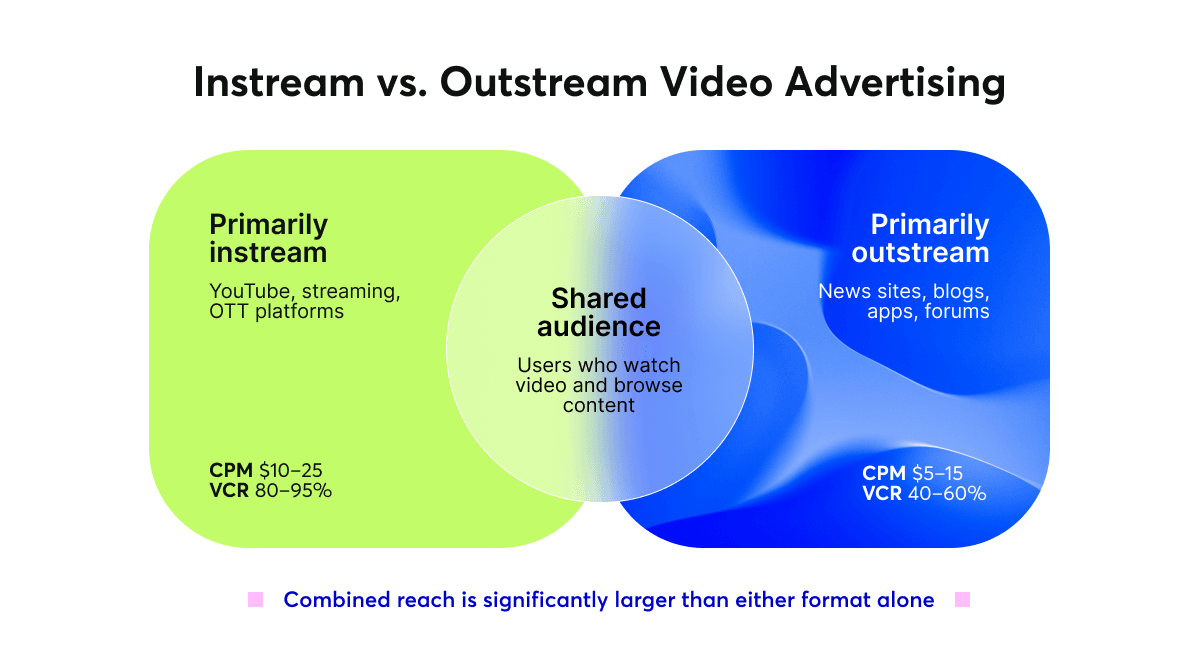
| Typical CPM range | $5–15 | $10–25 |
| Video completion rate | 40–60% (scroll-dependent) | 80–95% (CTV and premium OLV) |
| Primary advantage | Expands video reach | Captures viewers already watching video |
The biggest difference comes down to inventory. Instream ads can only run alongside video content, while outstream opens access to the vast majority of the open web, including news sites, blogs, forums and apps that don’t host video.
The CPM and completion rate gap reflects this trade-off. Instream commands a premium because the viewer is already in video-watching mode and far more likely to watch through to the end. Outstream trades some of that engagement depth for dramatically wider reach.
Many brands use both formats as part of the same campaign. Instream captures viewers already consuming video, whereas outstream extends exposure to audiences who may be reading articles or browsing content feeds.
For example, a fitness brand launching a new app might use instream ads on YouTube to reach video viewers and deploy outstream ads on health and wellness websites to reach readers researching workout routines. Using both formats helps the campaign appear across more touchpoints rather than relying on a single type of inventory.
When to Use Outstream Video Ads
Outstream is a strong fit in several specific scenarios:
- Video budget, no video inventory: The brand has video creatives ready but the target publishers don't run video content. Outstream is often the only viable option.
- Mobile-first campaigns: Outstream formats are built for scroll-based browsing. If the target audience spends most of their time on mobile, outstream placements tend to align well with that behavior.
- Contextual targeting: Outstream allows brands to place video ads on pages that are directly relevant to the product: think a kitchen appliance ad within a recipe article or a travel brand on a destination guide. Instream rarely offers this level of contextual control.
- Frequency capping across touchpoints: When instream alone can't deliver enough impressions without overexposing the same audience, outstream provides an additional pool of inventory to evenly distribute frequency.
- Retargeting without video platforms: Users who visited the site but didn't convert can be retargeted with video creatives across the open web, not just on YouTube or social feeds.
When Outstream May Not Be the Best Choice
While outstream can help advertisers reach audiences beyond traditional video environments, it isn't the right fit for every campaign.
We recommend considering a different approach in these situations:
- High completion rate is the primary KPI: Instream on premium environments consistently delivers VCR of 80–95%, which outstream rarely matches due to scroll behavior. If the brief demands strong completion numbers, instream is the more reliable choice.
- The creative depends on sound: Dialogue-driven ads, music-led spots or any format where the audio carries the message will underperform in outstream. Most placements start muted and many users never unmute.
- Long-form storytelling: Videos over 30 seconds see significantly steeper drop-off in outstream environments.
- No mobile-optimized creative: A large share of outstream impressions comes from mobile. Creatives shot in landscape that rely on small on-screen text will lose impact on a phone screen.
- Brand safety is a strict requirement: Outstream runs across a wide range of open web inventory. Without careful allow-list management or a curated private marketplace deal, the ad may appear in environments that don't align with the brand.
As with any format, the right answer often comes from testing. Running outstream alongside instream on the same campaign reveals where each format contributes and where it doesn't.
Benefits of Outstream Video Ads for Advertisers and Publishers
Outstream delivers different advantages depending on which side of the transaction you're on.
For advertisers:
- Access to video inventory on publishers that don't host video content
- Contextual placements that are directly relevant to the product
- Additional scale alongside existing instream activity
- Mobile-friendly formats suited to scroll-based browsing behavior
For publishers:
- Video ad revenue without producing or hosting any video content
- Higher CPMs compared to standard display placements
- Video demand accessible on editorial pages, blogs and content feeds
- Entry into video advertising budgets without redesigning page layouts
For Publishers: How to Add Outstream Ad Inventory to Your Website
As we’ve already mentioned, outstream does not require a video player or original video content. Publishers can monetize existing article pages by adding outstream placements that serve video ads within the page content.
1. Choose a Monetization Method
The first step is selecting how outstream ads will be delivered on your site. Before implementation, verify that your SSP, ad server or monetization partner supports outstream demand and VAST-compatible creatives.
- Google Ad Manager (GAM) is the most widely used ad server for outstream advertising. It supports in-read and in-banner formats natively and integrates with most demand partners.
- Header bidding wrappers, such as Setupad, Adpushup or Ezoic, allow publishers to run outstream ads through Prebid.js alongside existing display demand, maximizing competition for each impression.
- Direct outstream SDKs are offered by some supply-side platforms (SSPs). These solutions provide a lightweight JavaScript tag that handles the ad unit, viewability detection and VAST serving without requiring additional setup.
2. Generate and Implement the Ad Tag
Once you've selected a monetization partner, create an outstream ad unit and generate the corresponding ad tag or JavaScript snippet.
Depending on your setup, the code can be implemented directly within your website template or deployed through your ad server. In most cases, the platform manages video rendering, ad delivery and measurement automatically.
3. Place the Ad Unit Strategically
Placement has a significant impact on viewability and revenue.
For content-heavy pages, outstream units typically perform best when positioned between paragraphs, ideally after the second or third paragraph as users are already engaged with the content.
Avoid placing multiple outstream units on the same page, as this can reduce viewability rates and lower CPMs.
4. Optimize Loading and Viewability
To maximize performance without affecting user experience:
- Enable lazy loading so ads initialize only when approaching the viewport.
- Monitor viewability rates and identify placements that consistently underperform.
- Track CPM, revenue per session and video completion rate (VCR).
- Watch engagement metrics such as session depth and bounce rate after launch.
If user engagement declines, consider moving the placement lower on the page or reducing the number of outstream units.
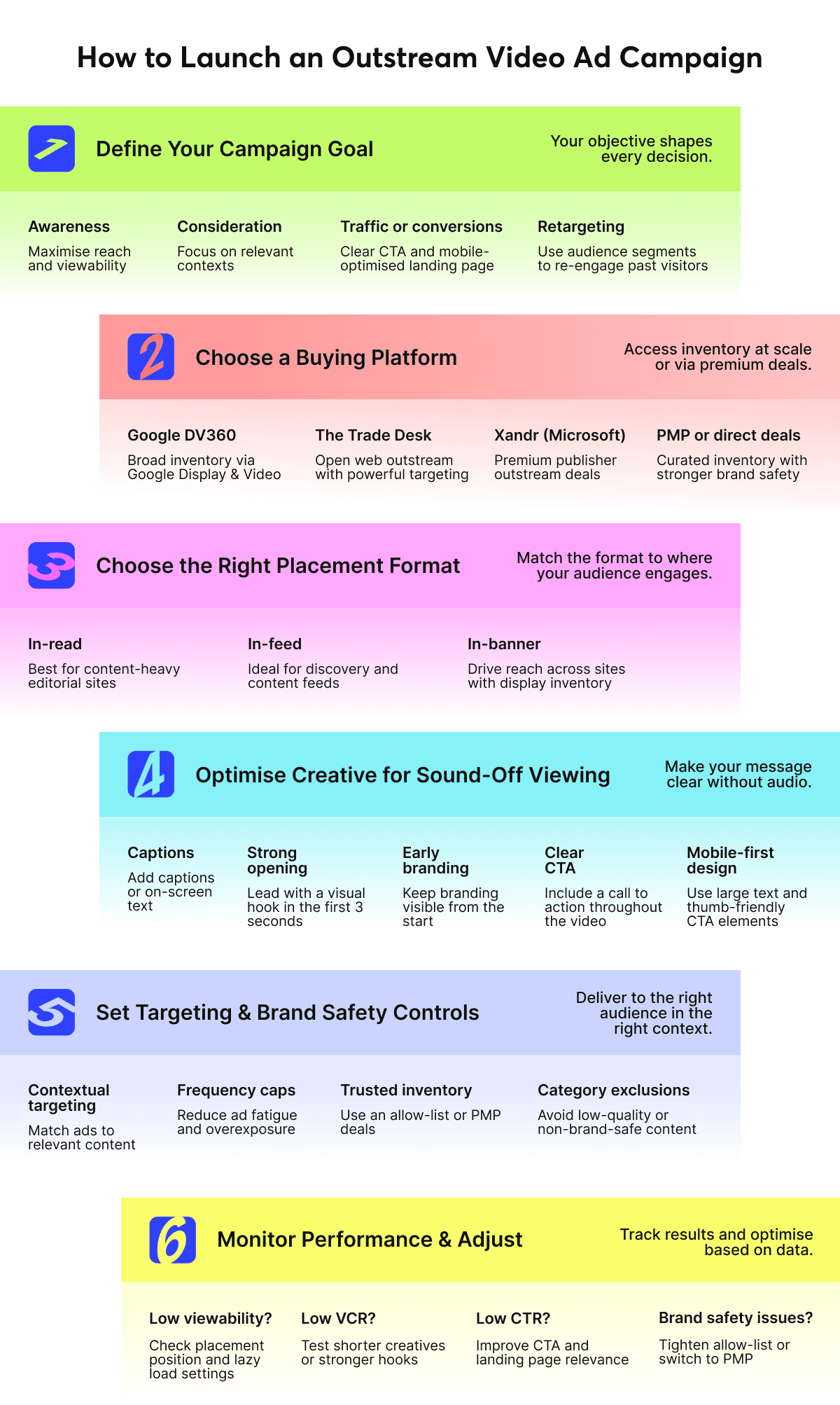
For Advertisers: How to Launch an Outstream Video Ad Campaign
Launching an outstream campaign starts with choosing the right environment for your ads. Since these placements appear outside traditional video players, the surrounding content and user experience play an important role in campaign performance.
1. Define Your Campaign Goal
Outstream can support different objectives, and your campaign goal shapes every decision that follows:
- Awareness: Prioritize reach and viewability over completion rate.
- Consideration: Focus on contextual placements relevant to the product category.
- Traffic or conversions: Ensure the creative has a clear CTA and the landing page is mobile-optimized.
- Retargeting: Use audience segments from your DMP or pixel data to reach past visitors across the open web.
2. Choose a Buying Platform
The buying approach will influence available inventory, targeting capabilities, reporting depth and overall campaign control. Most outstream campaigns run programmatically through a DSP:
- Google DV360 provides broad outstream inventory through Google Display & Video and is a strong option for achieving scale.
- The Trade Desk enables programmatic outstream advertising across the open web and offers robust audience-targeting capabilities.
- Xandr (Microsoft) is well suited for premium publisher outstream deals.
For direct deals, contact publishers individually or use a curated private marketplace (PMP) to access premium outstream inventory with stronger brand safety controls.
3. Choose the Right Placement Format
Different outstream formats suit different user behaviors and content environments, so placement selection should align with how your audience consumes content:
- In-read for content-heavy editorial sites where users are in reading mode;
- In-feed for discovery platforms and social-style content streams;
- In-banner for broad reach across sites with existing display inventory.
4. Optimize Creative for Sound-Off Viewing
Because most outstream videos autoplay without sound, creative assets must communicate the core message visually from the start:
- Add captions or on-screen text for key messages.
- Lead with a strong visual hook in the first three seconds.
- Keep branding visible early — don't save the logo for the final frame.
- Include a visible call to action throughout.
- For mobile, avoid small text and ensure the CTA button is thumb-friendly.
5. Set Up Targeting and Brand Safety Controls
To maximize relevance while protecting your brand reputation, configure targeting parameters and inventory quality controls before launching the campaign:
- Use contextual targeting to match ad placement to relevant content categories.
- Set frequency caps to avoid overexposing the same user across multiple outstream placements.
- Define an allow-list of approved publishers or use a PMP to limit inventory to trusted sources.
- Exclude low-quality or non-brand-safe categories at the DSP level.
6. Monitor Performance and Adjust
Continuous optimization is essential for improving performance and identifying issues before they impact campaign outcomes:
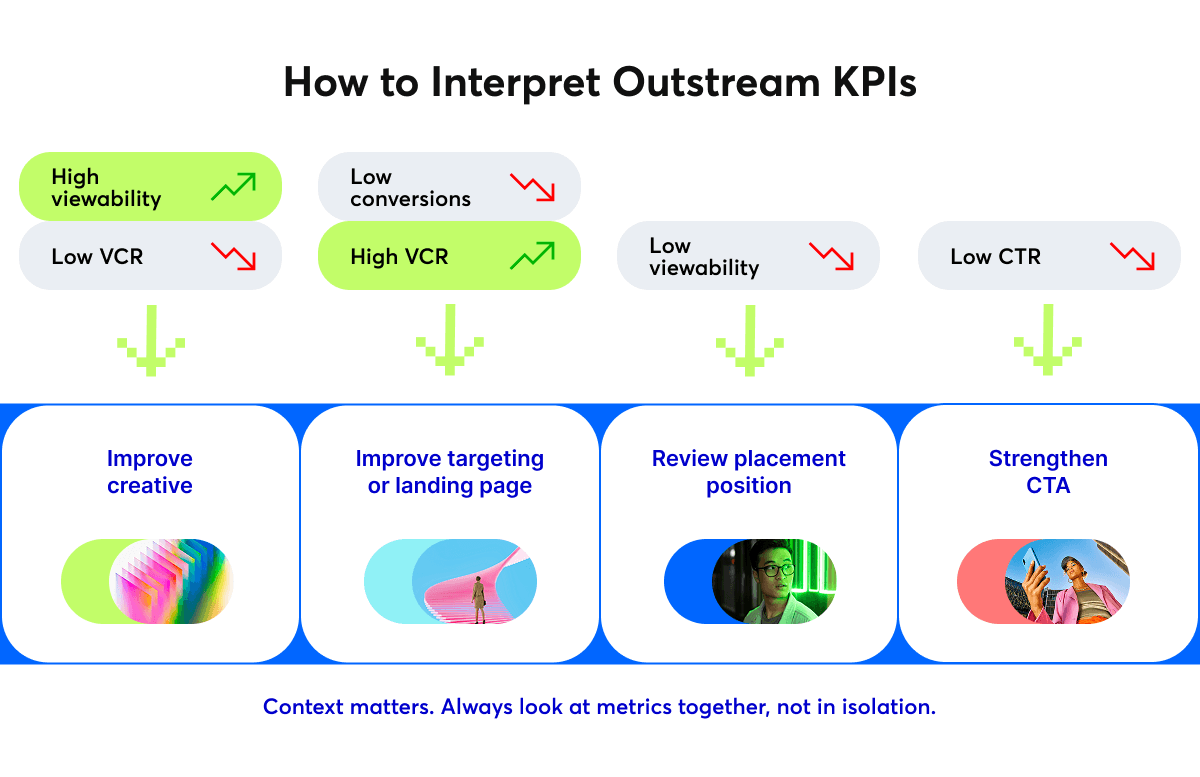
- If viewability is low, review placement position and lazy load settings.
- If VCR is low, test shorter creatives or stronger opening visuals.
- If CTR is low, revisit the call to action and landing page relevance.
- If brand safety flags appear, tighten the allow-list or switch to a PMP deal.
Key Metrics to Track
The right performance metrics depend on your campaign goals, but several indicators are commonly used to evaluate outstream video campaigns.
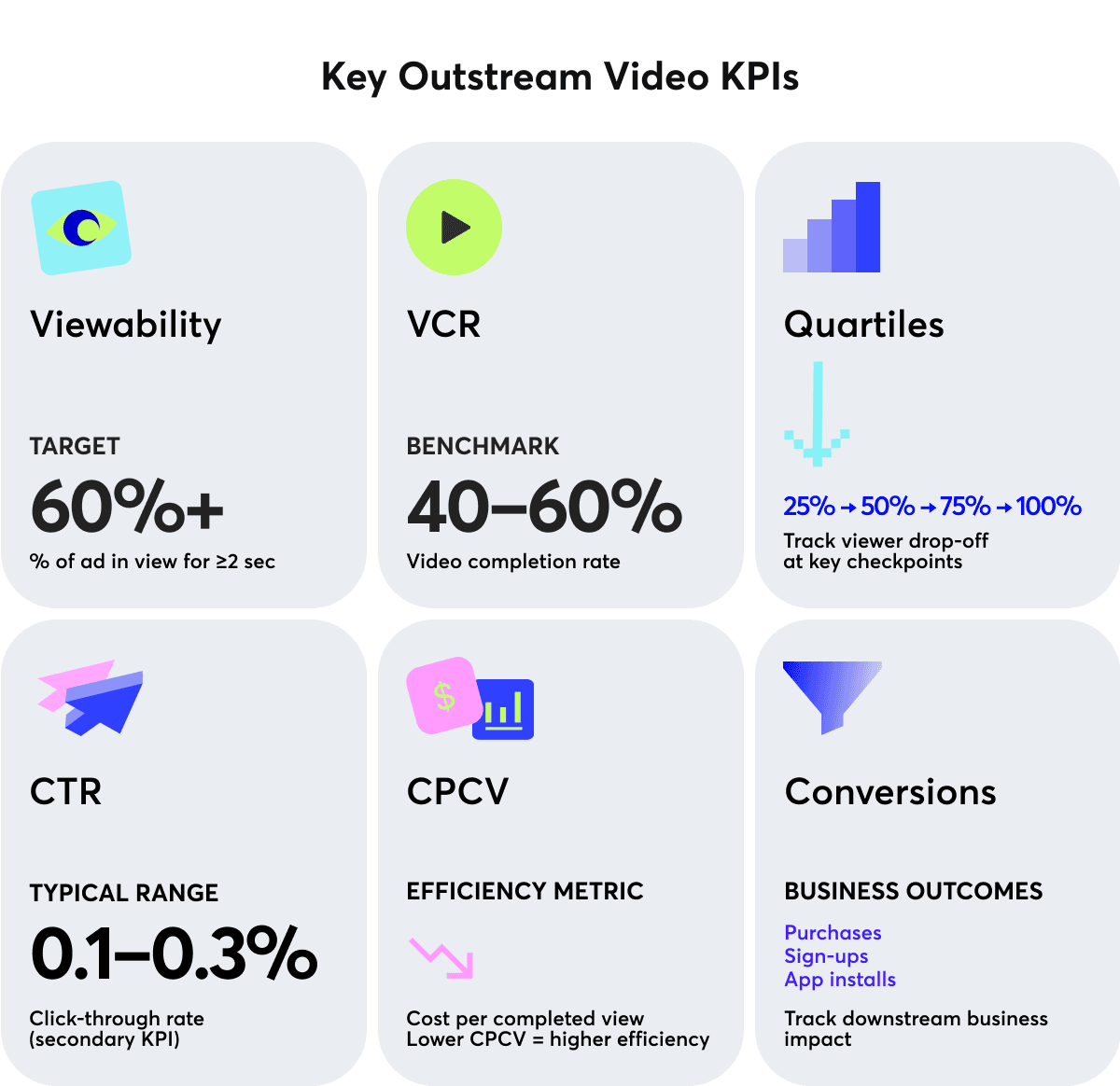
- Viewability measures whether the ad had a genuine opportunity to be seen. The IAB standard defines a viewable video impression as at least 50% of pixels visible for two or more consecutive seconds. For outstream, aim for viewability above 60%. If viewability is below that mark, placement position or lazy load settings likely need adjustment.
- Video completion rate (VCR) shows the percentage of users who watched the ad to the end. Outstream benchmarks typically range from 40–60%. A VCR below 30% usually signals a weak creative hook or a placement mismatch.
- Quartile tracking breaks completion into four checkpoints: 25%, 50%, 75% and 100% of the video watched. This is more diagnostic than VCR alone. For example, a steep drop between 25% and 50% points to a pacing problem in the middle of the creative; in contrast, a drop after 75% suggests the ending isn't landing.
- Click-through rate (CTR) measures how often users click after seeing the ad. Outstream CTR is typically low (0.1–0.3%) because video formats are not direct response tools. Since outstream is used for awareness and consideration, use CTR as a secondary signal, not the primary KPI.
- Cost per completed view (CPCV) shows how much each completed view costs. It is useful for comparing efficiency across placements and formats. For example, a placement with a higher CPM but stronger VCR may deliver a lower CPCV than a cheaper placement with poor completion.
- Conversions track downstream business outcomes: purchases, sign-ups and app installs. Attribute these carefully. Outstream often contributes to conversion paths without being the last touch, so view-through attribution windows are important to configure correctly.
A campaign with high viewability but low VCR needs better creative. High VCR but low conversions points to an audience or landing page problem. Reading metrics together gives a clearer picture than optimizing any single number in isolation.
Best Practices for Outstream Video Ads
The following practices are specific to outstream, as they address challenges that don't apply to instream or display ads in the same way.
First Three Seconds Are the Only Seconds That Matter
Outstream has no captive audience. A user scrolling past will decide in under three seconds whether to keep watching. Lead with the most compelling visual or the sharpest message.
Design the Creative as a Silent Film
Assume the sound will never be turned on. Every key message, product feature and call to action should be readable on screen. Captions are a requirement because they are the primary communication channel for most outstream impressions.
Match Video Length to Placement Type
- In-read: 15–20 seconds works well, as users are in reading mode and more likely to stay engaged with longer content.
- In-feed: 6–10 seconds is optimal, as users scroll quickly and attention spans are shorter.
- In-banner: Up to 15 seconds is recommended, as the ad unit is small and competes for attention with surrounding content.
Treat Mobile and Desktop as Separate Creatives
A 16:9 landscape video loses most of its impact on a phone screen. Vertical (9:16) or square (1:1) formats perform significantly better on mobile. If budget allows, produce separate cuts for each environment.
Don't Overload Ads on a Single Page
More than one outstream unit per page dilutes viewability and trains users to ignore the format. One well-placed in-read unit outperforms three poorly placed ones.
Run A/B Tests on the Opening Frame
The thumbnail or first frame is what users see before autoplay triggers. A strong static frame can increase play-through rate even before the video starts. Test different opening frames as you would test ad copy.
Conclusion
Outstream has changed the economics of video advertising by decoupling video creatives from video content. For advertisers, that means access to a vastly larger inventory pool. For publishers, it provides a way to participate in growing video advertising budgets without investing in video production or player infrastructure.
The core trade-off is straightforward: outstream delivers broader reach at lower CPMs and completion rates, while instream captures deeper engagement from audiences. Neither format is universally better, and the best format will depend on campaign objectives, creative assets and where the target audience actually spends time.
For most brands, the strongest approach combines both. Use instream to capture high-intent video audiences. Use outstream to extend reach across the open web, retarget past visitors and maintain visibility throughout the customer journey.
If you're running video campaigns only on instream today, outstream is worth testing as the layer that reaches everyone your current campaigns are missing.
FAQ on Outstream Video Ads
What are outstream video ads?
Video ads that play within articles, content feeds and mobile apps without requiring a video player or any existing video content on the page. They autoplay when scrolled into view and pause when scrolled away.
What is the difference between outstream and instream ads?
Instream runs before, during or after video content and requires a video player. Outstream creates its own ad unit within non-video page environments. Instream typically delivers higher completion rates (80–95%); outstream offers broader reach across the open web at lower CPMs ($5–15 vs. $10–25 for instream).
Do outstream ads require a video player?
No. The ad unit is self-contained and delivered via a VAST tag. The publisher places the tag on the page and the outstream unit handles playback, viewability detection and tracking independently.
Are outstream video ads skippable?
There is no skip button as with instream pre-roll, but outstream is inherently skippable — users can scroll past at any time. This is why the first three seconds of the creative are critical.
What video formats work best for outstream?
Short-form video (6–20 seconds) performs best. Vertical (9:16) or square (1:1) aspect ratios work better on mobile than landscape (16:9). All creatives should be designed for sound-off viewing with captions or on-screen text.
How is viewability measured for outstream ads?
The IAB standard requires at least 50% of the ad's pixels to be visible for two or more consecutive seconds. Most outstream implementations use the OMID SDK for viewability measurement, which replaced the older VPAID standard deprecated in 2025.
What is a reasonable completion rate for outstream?
Outstream VCR typically ranges from 40–60%, compared to 80–95% for instream on premium environments. Below 30% usually indicates a creative or placement problem worth investigating.
Can outstream ads run on mobile?
Yes, a significant share of outstream impressions comes from mobile. However, creatives should be optimized for smaller screens. Landscape videos shot for desktop lose impact on mobile; instead, use vertical or square formats.