Most visitors don't click into another article; instead, they close the tab and move on. Publishers spend a lot of time and money getting people to the site, but that final moment before someone leaves usually goes to waste.
Exit Story is MGID’s answer to that. It's a new format that detects when someone's about to leave and shows them a full-screen feed right at that moment, with content or ads that give the session one more chance to pay off.
Why the Last Moments of a Session Matter
Most monetization happens while people are actively browsing: reading articles, clicking around or moving from page to page. Unfortunately, most of the traffic nowadays never gets that far.
Visitors coming from Google Discover, search or social media often read one article and leave. They got what they came for, and that's it: no extra page views, no second chances.
While you can't stretch out every session, you can still capitalize on that last moment before someone leaves. If you catch the signs early enough and show something relevant, you get one more shot at a session that would've otherwise just ended.
What is Exit Story?
The difference from our classic MGID Story format is in the trigger. MGID Story only reacts when someone clicks the browser's back button. Exit Story reacts to user behavior, such as going idle, scrolling back up or switching tabs. That way, it can catch someone leaving even if they never touch the back button at all.
Under the hood, it's built on tech you may already know: Smart Widget for the ad demand and design, Swipe Up for how the format opens and our Exit User Activity triggers for detecting when someone's about to go. We just combined them into one exit-monetization format.
A few things that set Exit Story apart:
- It's built for how people browse today.
- It's an immersive, full-screen format, but users can close it in one tap.
- It runs automatically once configured.
How Exit Story Works
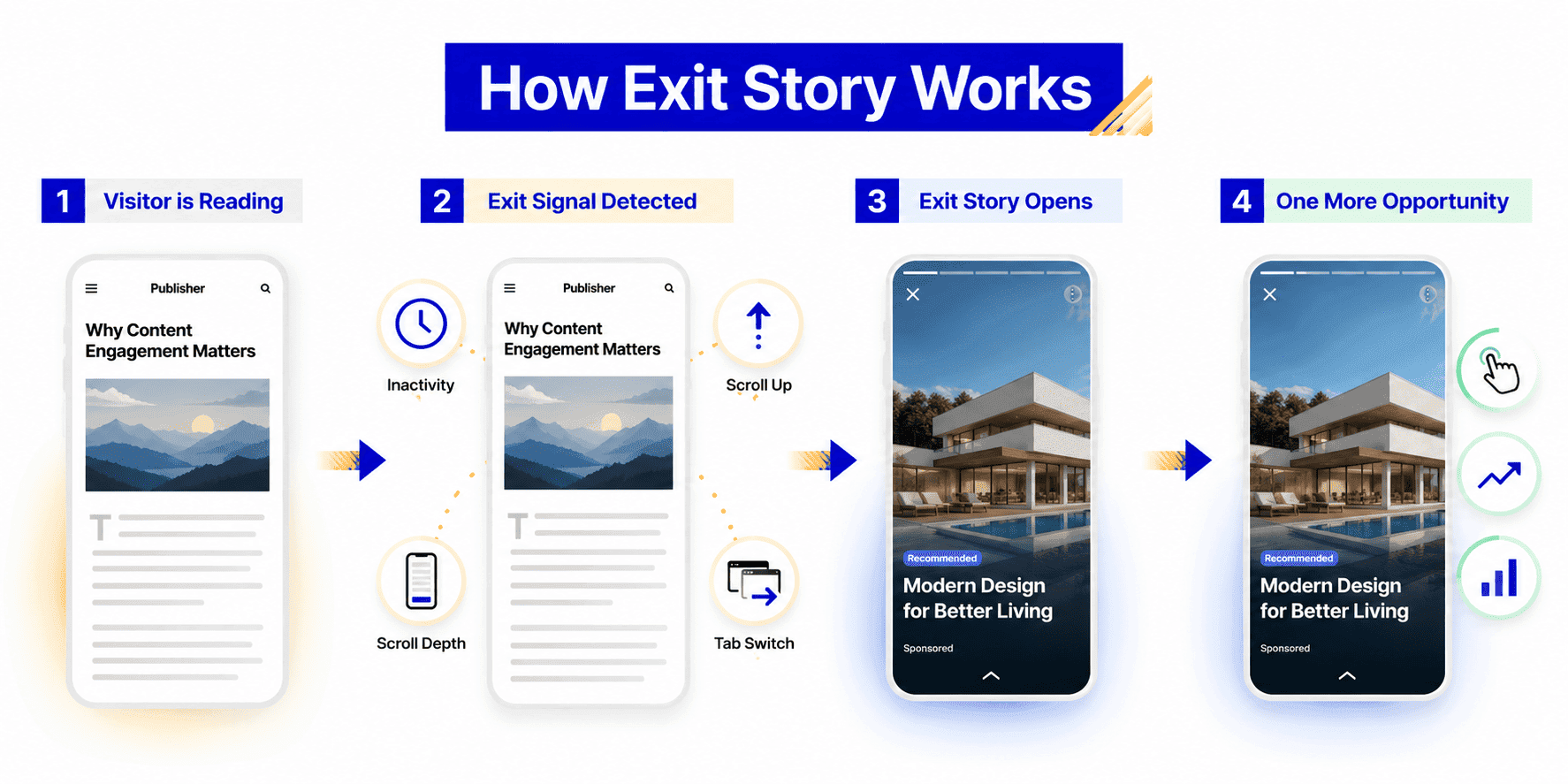
Here's the flow in practice:
- A visitor lands on your page and starts reading your content.
- Exit Story monitors for exit intent using one or more behavioral signals.
- Once a trigger is detected, the Story opens with relevant recommendations or ads.
- The user can explore the content, close the format or continue browsing, whatever feels most desirable to them.
What counts as a signal that someone's about to go? A few examples:
- They've stopped interacting with the page for a while.
- They scroll back up after reading, like they're looking for the way out.
- They hit a certain scroll depth.
- They switch to another tab.
You can turn each of these signals on or off depending on what fits your audience.
Why Exit Story Takes a Different Approach
For years, the go-to exit format relied on the browser's back button. It worked well, but it also means the whole format lives or dies by how Google treats that button.
And that's becoming a real concern. In April 2026, Google announced that back-button hijacking will count as a violation of its spam policies, with enforcement starting in June 2026. Sites relying on this technique risk manual actions or automatic demotions in search, which is exactly the traffic you don't want to put at risk.
This is where Exit Story becomes especially valuable. It doesn't touch the back button. That means it keeps working no matter what happens to back-button-based formats, and it gives you a legitimate way to catch exit intent that isn't tied to a single, increasingly risky browser event.
| Traditional exit formats | Exit Story |
|---|---|
| Triggered by a specific browser action | Triggered by user behavior |
| Limited activation options | Multiple configurable triggers |
| One exit scenario | Adapts to different browsing patterns |
By looking at user behavior instead of a single browser action, Exit Story gives publishers more ways to engage visitors before they leave.
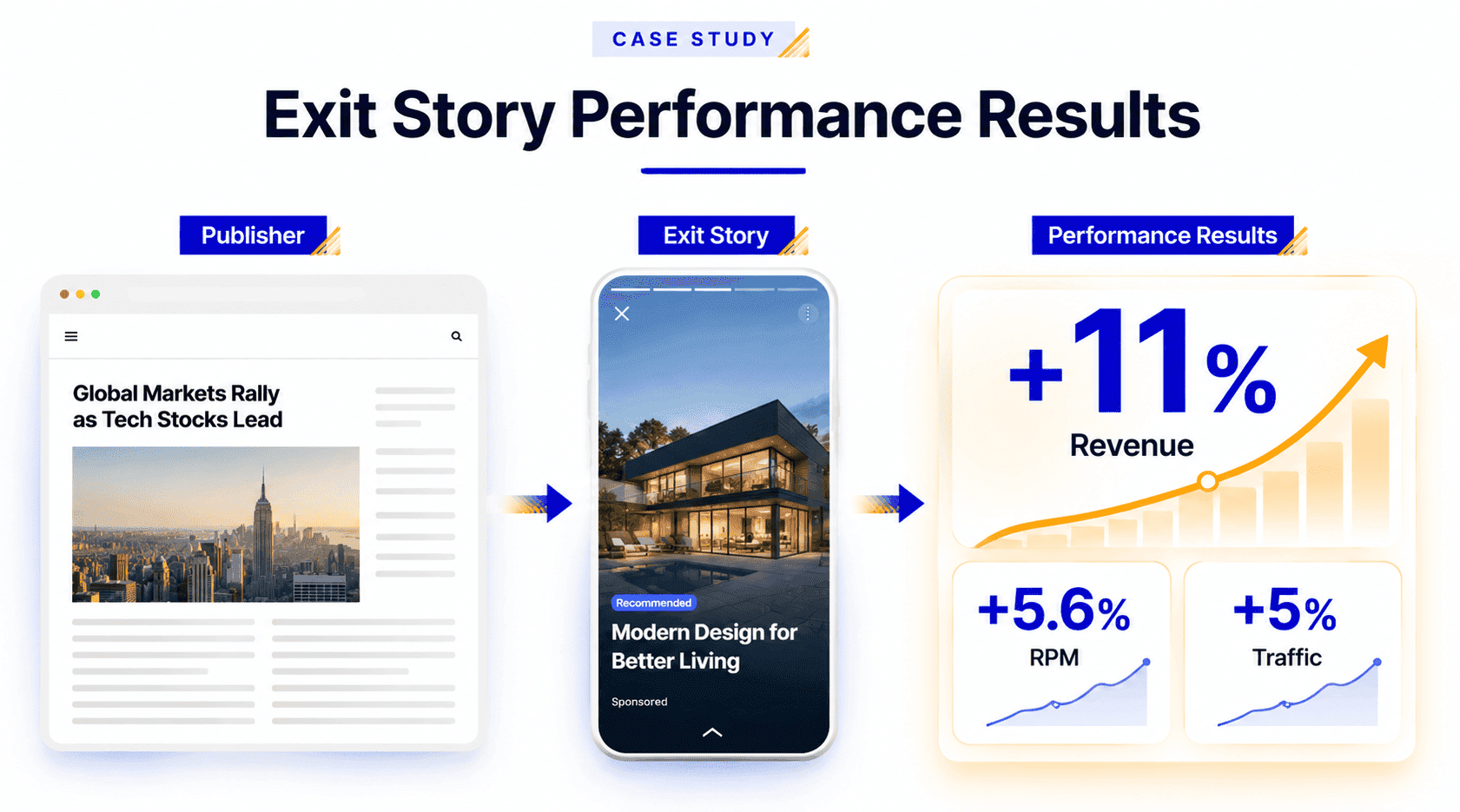
Case Study: A Top Polish Publisher Grew Revenue by 11%
One of our publishers, a major Polish news and media site, was running the classic Story format, and it made up close to 30% of their total revenue. When the Google policy change came into play, they had to phase it out quickly to stay compliant.
With our help, the publisher swapped it for Exit Story as a direct, one-to-one replacement. The switch went smoothly with no technical issues, no user complaints and no increase in churn. And instead of preserving the publisher's earnings, Exit Story helped increase them. Revenue grew by 11% and RPM was up 5.6%, while traffic itself only grew by 5% over the same period. In other words, the uplift was driven by improvements to the format rather than by higher visitor volume.
Why Publishers Will Like Exit Story
A few concrete reasons Exit Story is worth setting up.
- It monetizes sessions that would otherwise end empty: Most visitors won't open a second article or click another ad. They're already halfway out the door. Exit Story gives that final moment another opportunity to generate value.
- It gets more out of your search and social traffic: Visitors from search and social tend to read one thing and leave. Exit Story doesn't need them to stick around or browse more pages: it works with a single-page visit.
- It can lift RPM without adding more clutter to the page: Rather than stacking another widget into the content, you're adding a monetization moment at the exit. In early testing, publishers have seen RPM go up by around 5% on average.
Who Can Benefit Most from Exit Story?
MGID built Exit Story around the moment of exit and not for any particular publisher profile. That said, it's especially worth trying if:
- a big chunk of your traffic comes from Google Discover, search or social, where single-page visits are the norm;
- you run a news, entertainment or content site that publishes constantly;
- you're already using MGID Story and want another layer of exit monetization on top of it.
In short, if your traffic tends to show up, read one thing and go, Exit Story is built for exactly that.
Getting Started with Exit Story
Setting up Exit Story is simple and doesn't take any custom development on your end:
- Contact your MGID Success Manager or Support team to create an Exit Story Smart Widget for your account.
- Work with your MGID representative to configure Swipe Up mode, exit triggers and the widget design.
- Add the widget to your website using MGID's Single JS implementation.
Once it's live, Exit Story shows up automatically whenever the configured conditions are met.
Final Thoughts
Not everyone's going to open a second page, but that doesn't mean the session's over as far as value goes. Exit Story just gives you one more shot at it before the user is gone.
Want to try it? Reach out to your MGID account manager and they'll help you set it up.