Updated: September 2026
When Google Ads happily spends the budget without producing conversions, guessing what went wrong can get expensive fast.
A campaign can struggle for dozens of reasons, and the Google Ads interface doesn’t always make the culprit obvious. Tracking may have broken, broad match may be pulling in questionable searches, Smart Bidding may be working with too little data or perfectly relevant clicks may be landing on a page that simply doesn’t close the deal.
The fastest way forward is to diagnose the problem in the right order, starting with the things that can waste the most time and money if they go unnoticed.
Start Here: 5 Quick Checks Before You Change Anything
Before changing bids, rewriting ads or giving the algorithm something new to “learn,” spend a few minutes checking whether the problem is hiding somewhere much simpler.
- Make sure conversions are actually being recorded: Check the conversion action status and test the tag. A tracking failure can make a healthy campaign look completely dead.
- Check whether the campaign is serving and spending normally: Look for campaign or ad disapprovals, budget limitations and sudden changes in impressions, clicks or spend.
- Look for recent changes and learning status: A new bid strategy, budget change, conversion-action change or major campaign edit can temporarily affect performance.
- Open the Search terms report: See what people actually typed before clicking. Broad match can take a campaign into some surprisingly creative territory.
- Follow the click yourself: Open the landing page on desktop and mobile, test the form or checkout and make sure the offer shown on the page matches what the ad promised.
If one of these checks exposes the problem, fix it before rebuilding the campaign around a diagnosis you don’t need.
The pattern itself can also tell you where to look first. A campaign that has never converted calls for a different investigation than one that was performing normally and suddenly dropped.
| If you see | Check first |
|---|---|
| Zero conversions from day one | Tracking → traffic volume → search terms |
| Conversions suddenly disappeared | Tracking → recent changes → reporting delay |
| Clicks increased but CVR fell | Search terms → traffic mix → landing page |
| Traffic and conversions both fell | Serving → budget → demand → bidding |
Still no obvious culprit? Use the quick diagnostic below to narrow down where to investigate next.
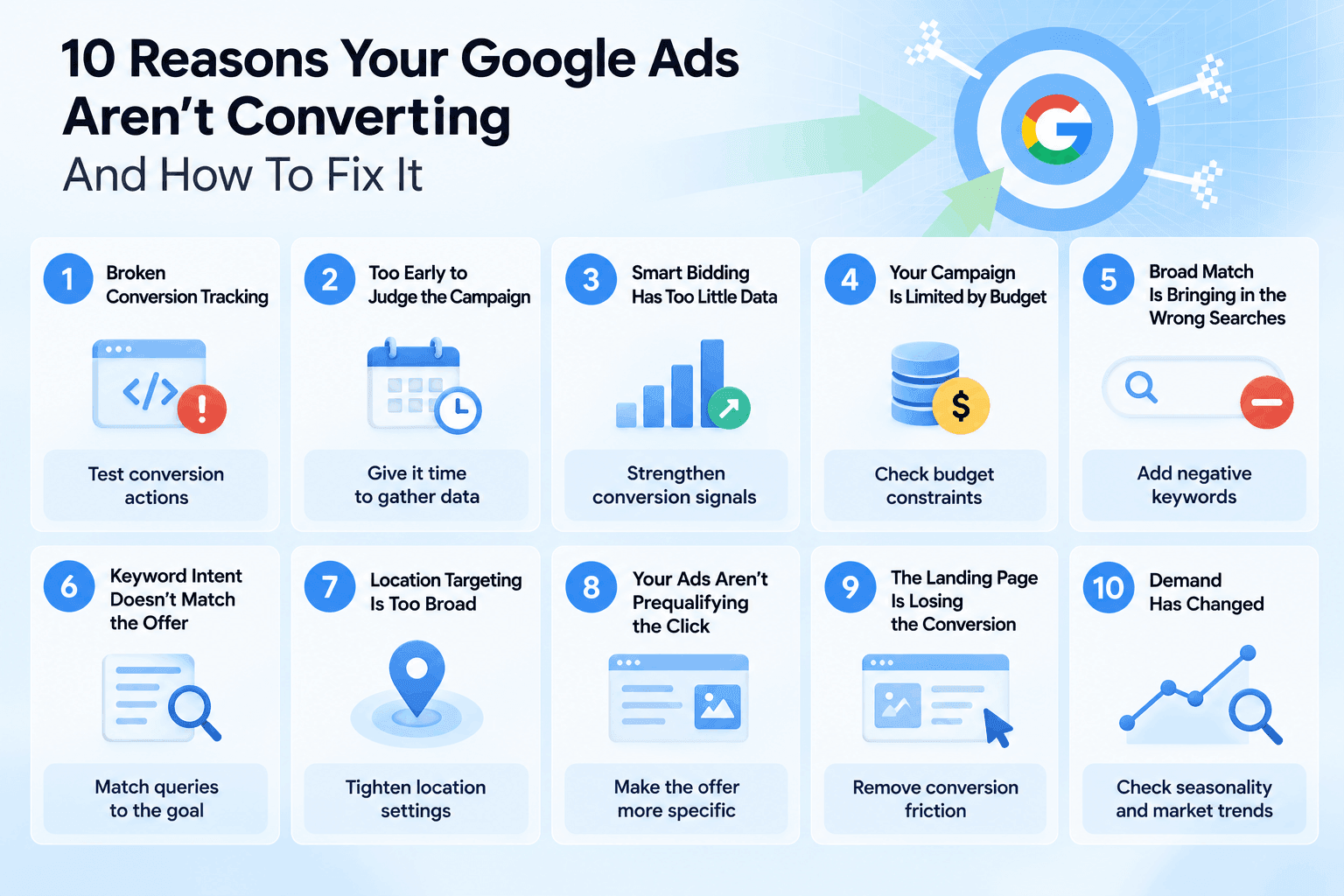
10 Reasons Your Google Ads Aren’t Converting
Some problems leave obvious clues; others quietly drain the budget for weeks. Here are the ten places worth investigating, starting with the issues that can distort everything else you see in the account.
1. Broken Conversion Tracking
A campaign showing zero conversions may still be generating leads or sales. If the conversion action, tag or goal setup is broken, Google Ads simply isn’t seeing them, and Smart Bidding may be optimizing with bad information as a result.
This deserves an early check after website changes, tag updates or sudden drops that don’t match what you see in your CRM, store or analytics.
How to fix it:
- Verify the conversion action status: Look for inactive, unverified or misconfigured actions in Google Ads.
- Test the tag with Google Tag Assistant: Complete the conversion yourself to make sure the event fires at the right moment.
- Inspect consent and enhanced conversion diagnostics: If you use Consent Mode or Enhanced Conversions, make sure consent signals and first-party data are reaching Google correctly. A working base tag doesn't necessarily mean the full measurement setup is healthy.
- Confirm the campaign’s optimization goals: Go to Campaigns → Settings → Conversion goals and confirm that the right goals and primary conversion actions are being used for bidding. Google still documents this as the current path in 2026.
- Review recent changes if conversions disappeared suddenly. A website release, new checkout, consent setup or conversion-goal change is a much better suspect than an algorithm mysteriously forgetting how advertising works.
| What to expect | When to expect it |
|---|---|
| Accurate conversion reporting and better optimization signals for campaigns using Smart Bidding. | Tracking should work as soon as the implementation is fixed. Smart Bidding may need 1–2 conversion cycles to adjust after conversion-goal or action changes. |
2. Too Early to Judge the Campaign
A fresh campaign rarely arrives with enough information to make perfect bidding decisions from day one. Automated bidding needs conversion data and time to understand which auctions are more likely to produce the outcome you want.
The same can happen after significant changes to bidding, conversion goals or campaign settings. Performance may wobble while the system recalibrates, so reacting to every bad day with another edit can keep resetting the process you’re trying to finish.
A campaign can also look broken simply because it hasn't generated enough clicks for zero conversions to be unusual. Instead of judging by the number of days it has been running, compare your traffic volume with the conversion rate you would realistically expect.
How to fix it:
- Check the bid strategy status before making another change: A Learning status means Google is still adjusting after a new strategy or significant change.
- Look at your conversion delay: If customers typically take several days to convert after clicking, yesterday’s performance is naturally incomplete.
- Compare the right dates: Google Ads can attribute conversions to the date of the ad interaction rather than the day the conversion happened. Check conversion-time columns before treating a recent decline as final.
- Stop stacking major edits: Give meaningful changes enough time to generate data before changing bids, budgets, targeting and conversion goals again.
- Judge performance over conversion cycles rather than a fixed number of calendar days: A campaign with a seven-day conversion cycle needs a different evaluation window from one where most conversions happen within hours.
| What to expect | When to expect it |
|---|---|
| Less volatile performance as bidding gathers more information and recent conversions finish reporting. | Smart Bidding calibration can take up to around 50 conversion events or three conversion cycles, although campaigns with more data may stabilize sooner. |
3. Smart Bidding Has Too Little Data
Smart Bidding can automate a lot, but it still needs useful signals to work with. A campaign generating only a handful of conversions gives the system very little evidence about which auctions, users and queries are actually valuable.
This becomes especially painful with aggressive Target CPA or Target ROAS goals. The strategy has little data to learn from and a narrow target to hit, which can restrict traffic and make it even harder to collect the conversions it needs.
How to fix it:
- Check conversion volume: Look at how many meaningful conversions the campaign has generated recently and whether that volume is consistent enough for the bidding strategy to learn from.
- Loosen unrealistic targets: If Target CPA or Target ROAS is severely restricting delivery, move the target closer to recent actual performance rather than asking the algorithm for a number it has never achieved.
- Consolidate fragmented campaigns: Combining campaigns or ad groups with the same objective can give automation a larger pool of signals instead of splitting limited conversion data across multiple small setups.
- Feed bidding meaningful conversions: Optimize toward actions that represent real business value. A flood of low-value micro-conversions may create more data without teaching the system who actually becomes a customer.
| What to expect | When to expect it |
|---|---|
| More consistent delivery and better bidding decisions as the strategy receives a stronger stream of relevant conversion signals. | Give major bidding changes at least 1–2 conversion cycles before judging the new direction. Very low-volume campaigns may need longer. |
4. Your Campaign Is Limited by Budget
A tight budget becomes a conversion problem when the campaign regularly runs out of room to compete. Google may have eligible searches and promising traffic available, but the daily budget limits how often the campaign can enter those auctions.
The clue to look for is “Limited by budget.” It means Google estimates that the campaign could receive more traffic within its current targeting and bidding setup if more budget were available.
How to fix it:
- Check the campaign status: Look for Limited by budget in the Status column rather than assuming a low conversion count automatically means the budget is too small.
- Review budget recommendations carefully: Google Ads may suggest a higher daily budget based on recent performance and traffic opportunities. Treat it as an estimate, not an instruction to open the wallet on command.
- Check lost impression share: For Search campaigns, Search lost IS (budget) can show how often budget prevented your ads from appearing.
- Prioritize before increasing spend: Move budget toward campaigns, locations, devices or periods producing valuable conversions and cut obvious waste before simply adding more money.
| What to expect | When to expect it |
|---|---|
| More eligible traffic and additional conversion opportunities if budget was genuinely constraining a campaign that already converts efficiently. | Delivery can increase as soon as the new budget takes effect. Judge the conversion impact after enough additional traffic has accumulated to cover at least one conversion cycle. |
5. Broad Match Is Bringing in the Wrong Searches
Broad match gives Google plenty of freedom to find relevant searches beyond the exact keywords in your account. That reach can be useful, especially alongside Smart Bidding, but it can also introduce traffic that looks vaguely related on paper and has very little chance of converting.
The Search terms report is where the reality check happens. If you’re paying for queries with the wrong intent, irrelevant meanings or audiences you never meant to reach, broad match needs tighter guardrails.
How to fix it:
- Review actual search terms: Check the Search terms report regularly to see which queries are triggering your ads and spending meaningful budget.
- Segment traffic by network: If Search Partners are enabled, compare their performance with Google Search rather than assuming all Search campaign clicks have the same intent and conversion quality.
- Add negative keywords: Exclude irrelevant searches and recurring patterns that clearly don’t belong in the campaign.
- Use negative keyword lists: Apply shared lists when the same exclusions, such as jobs, free products or unrelated product categories, need to cover multiple campaigns.
- Look for patterns before blocking aggressively: A single odd query may be noise. Repeated irrelevant themes are a much stronger signal that an exclusion is needed.
| What to expect | When to expect it |
|---|---|
| A cleaner search-term mix, less spend on irrelevant clicks and more budget available for queries with genuine conversion potential. | Negative keywords can stop eligible unwanted queries from triggering ads once applied. Changes in CPA and conversion rate become clearer as new traffic replaces the excluded searches. |
If the problem is coming from a Performance Max campaign, keyword-level troubleshooting won’t tell the whole story. Review channel performance, search-term insights, asset-group performance and whether branded demand is accounting for a disproportionate share of reported conversions.
6. Keyword Intent Doesn’t Match the Offer
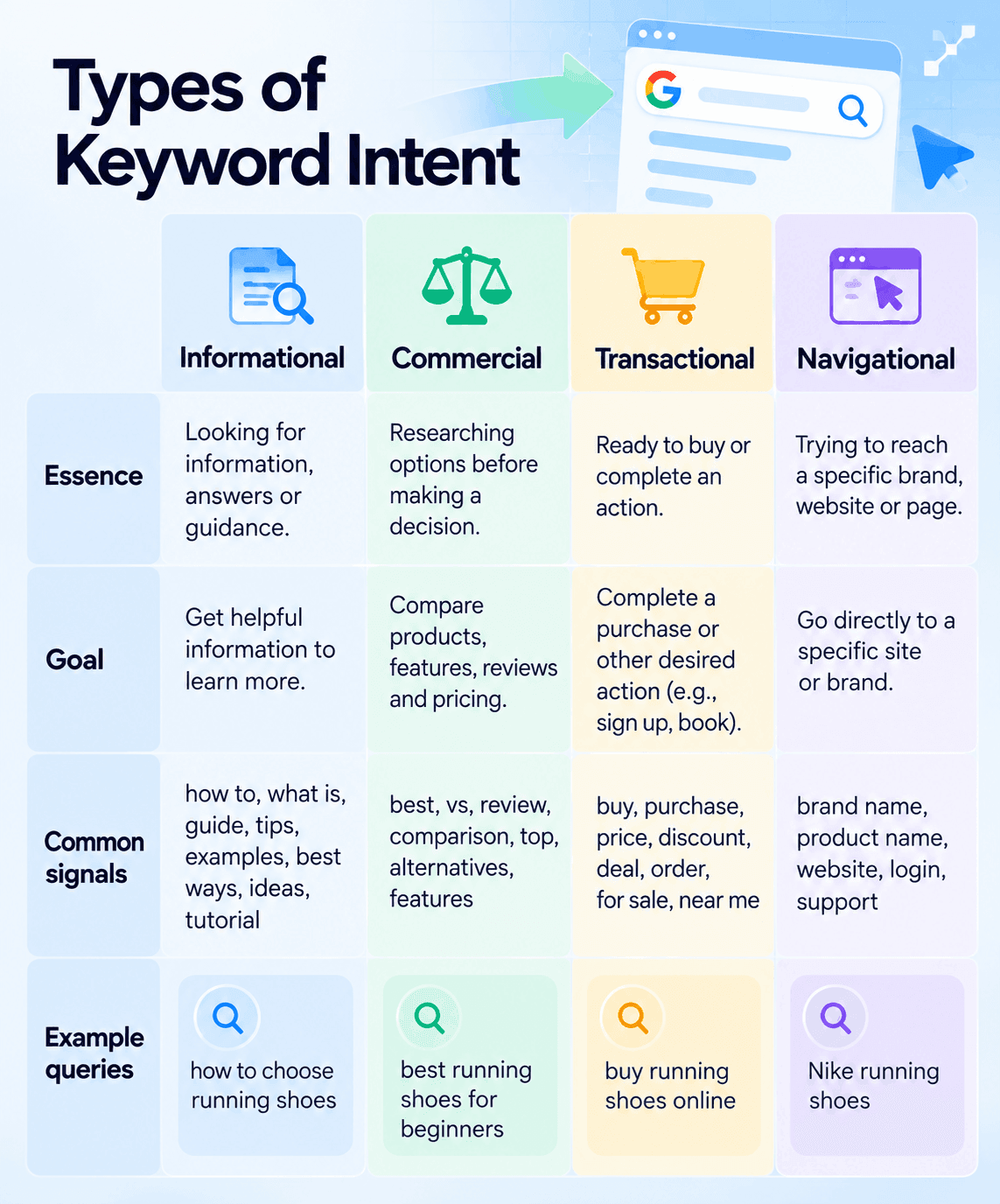
A keyword can be completely relevant to your product and still attract the wrong person at the wrong moment. Someone searching for “best CRM software” may still be comparing options, while “CRM pricing” or “buy CRM software” suggests a very different level of readiness.
This is where a campaign can look healthy on the surface: impressions, clicks and CTR are coming in, yet conversions remain stubbornly low because the searches behind those clicks don’t match the action you’re asking people to take.
How to fix it:
- Check intent in the Search terms report: Look beyond the keyword itself and identify whether actual queries are informational, commercial, transactional or navigational.
- Match keywords to the conversion goal: Prioritize searches that make sense for the action you want, whether that’s a purchase, demo request, call or lead.
- Separate different stages when useful: Give research-heavy and high-intent searches different ads and landing experiences instead of forcing them through the same funnel.
- Check the landing-page promise: Make sure someone clicking a transactional ad reaches a page where the expected action is immediately available.
| What to expect | When to expect it |
|---|---|
| More qualified clicks and a search-term mix that better reflects the campaign’s conversion goal. | Traffic quality can shift as soon as targeting changes take effect. Evaluate conversion-rate and CPA changes after enough new traffic has accumulated to cover at least one conversion cycle. |
7. Location Targeting Is Too Broad
Location targeting can quietly send perfectly valid clicks from people you never intended to reach. This is especially painful for local businesses: a plumber in Chicago has little use for an enthusiastic click from someone researching Chicago from another state.
Google Ads can target people based on presence in a location or include people who have shown interest in that location. The right setup depends on the business and where customers actually need to be.
How to fix it:
- Check your location option: For campaigns that require customers to be physically in the service area, review whether Presence makes more sense than Presence or interest.
- Review geographic performance: Check which locations are actually generating clicks, spend and conversions, then exclude areas that consistently bring irrelevant traffic.
- Tighten the service area: Remove locations or radiuses the business cannot realistically serve.
- Watch for location intent: Travel, tourism and destination-based businesses may benefit from people outside the target location, so don’t switch to Presence automatically.
| What to expect | When to expect it |
|---|---|
| Less spend outside the useful geographic market and a higher share of clicks from people the business can actually serve. | Traffic distribution can change once the location settings are updated. Conversion impact usually needs at least one conversion cycle and enough new clicks to evaluate reliably. |
8. Your Ads Aren’t Prequalifying the Click
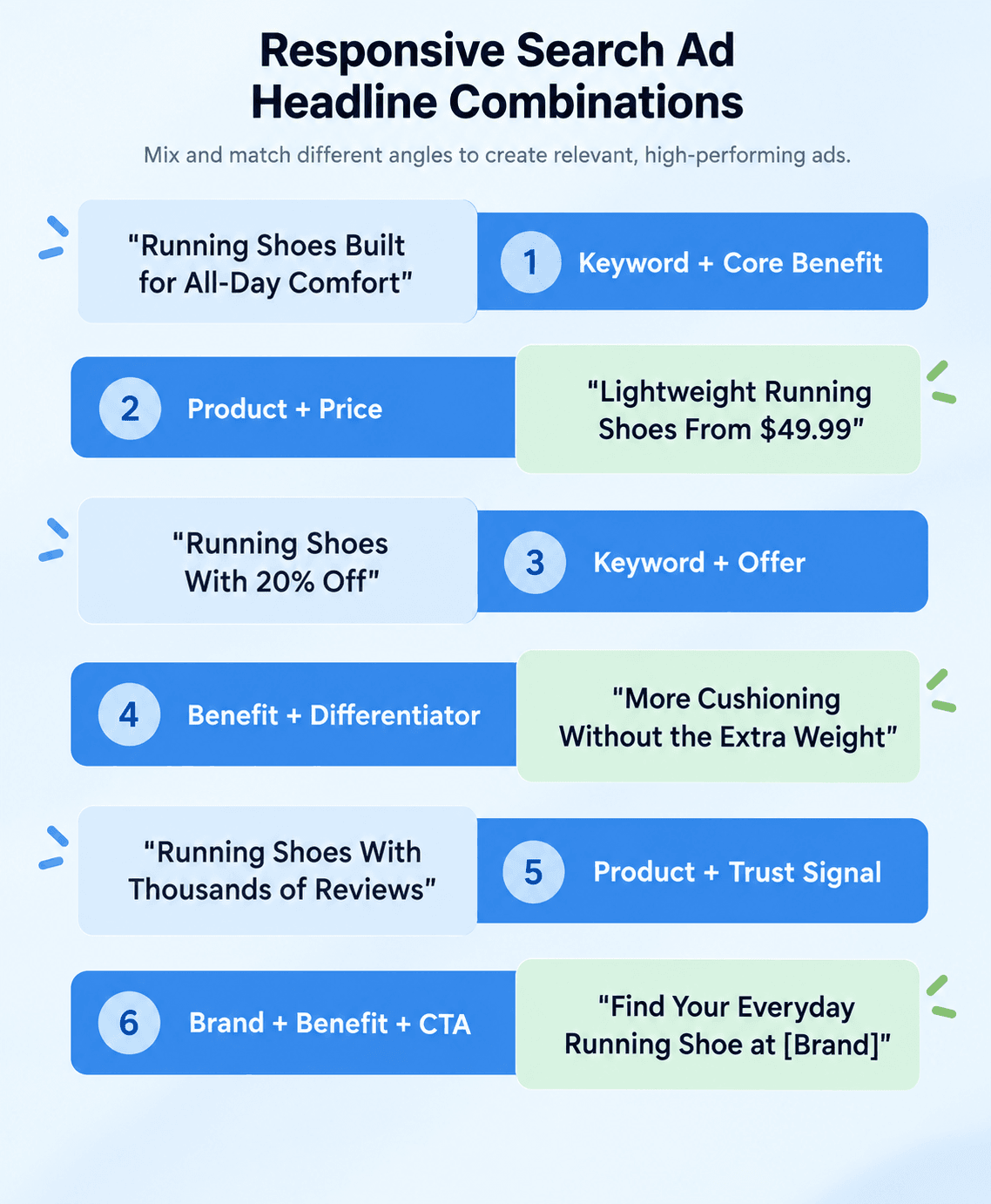
A search ad can earn plenty of clicks and still do a poor job of attracting potential customers. Generic promises such as “Best Solutions” or “Get Started Today” leave important details for the landing page, which means people may click before discovering the price, eligibility requirements or what the product actually offers.
Good ad copy should help filter traffic before you pay for the visit. Sometimes making an ad more specific can even reduce CTR while improving the conversions that actually matter.
How to fix it:
- Make the offer specific: Include useful details such as price, starting price, audience, location, key requirement or differentiator when they help people decide whether the offer fits.
- Align headlines with the search: Use Responsive Search Ad assets that reflect the themes and intent of the ad group rather than filling every headline slot with generic variations.
- Use assets to add context: Sitelinks, callouts, structured snippets and other relevant assets can communicate details before the click.
- Check the full path: The promise made in the ad should continue naturally on the landing page, including the offer, terminology and expected next step.
| What to expect | When to expect it |
|---|---|
| A higher share of qualified visitors and fewer clicks from people who discover only after landing that the offer isn’t for them. CTR may move in either direction, so judge the change by conversions and CPA. | New ad assets can begin influencing traffic once they are approved and serving. Give the new creative enough impressions, clicks and at least one conversion cycle before comparing conversion performance. |
9. The Landing Page Is Losing the Conversion
When search terms look relevant and the ads are attracting the right people, the next suspect is the page they land on. Slow loading, a vague value proposition, an overambitious form or a checkout that feels like paperwork can waste perfectly good paid traffic.
Message continuity matters too. Someone who clicks an ad for “30% off running shoes” shouldn’t have to hunt around the site to find the discount or wonder whether it exists at all.
How to fix it:
- Test the page yourself: Complete the journey on desktop and mobile, including forms, checkout, payment and confirmation pages.
- Check page speed: Use PageSpeed Insights to identify loading and Core Web Vitals issues that could be costing you visitors before they engage.
- Match the ad promise: Keep the offer, pricing, product and primary message consistent from search ad to landing page.
- Remove unnecessary friction: Shorten forms, make the CTA obvious and remove steps or distractions that don’t help someone convert.
- Test meaningful changes: Compare stronger headlines, offers, page structures or forms rather than changing button copy from “Start” to “Get Started” and hoping for a miracle.
| What to expect | When to expect it |
|---|---|
| More conversions from the traffic you already pay for and fewer users dropping out between the click and the final action. | Technical fixes can help immediately. Evaluate larger UX or offer changes after enough traffic has reached the updated page to produce a meaningful conversion sample. |
10. Demand Has Changed
Sometimes a campaign keeps doing roughly the same thing while the market around it moves. Search demand can rise or fall with seasonality, holidays, news cycles, competitor activity and changes in how people shop for a product.
That makes a sudden conversion dip easy to misdiagnose. Cutting bids, rewriting every ad and rebuilding the campaign won’t create demand that temporarily isn’t there.
How to fix it:
- Compare the right periods: Look at year-over-year performance and previous seasonal periods rather than judging every decline against last month.
- Check search demand: Use Google Trends and Keyword Planner to see whether interest in important products or search themes has changed.
- Separate demand from campaign performance: If impressions and search volume fall while CTR and conversion rate remain relatively stable, the campaign itself may not be the main problem.
- Adapt budgets to the cycle: Preserve budget during quieter periods and plan additional spend around predictable peaks instead of forcing the same volume all year.
- Refresh the offer when demand softens: Seasonal messaging, promotions or a more timely angle can give people a stronger reason to act when baseline demand is lower.
| What to expect | When to expect it |
|---|---|
| A clearer picture of whether performance changed because of the campaign or the market, plus budgets that follow real demand more closely. | Budget and messaging changes can affect performance quickly, but seasonal conclusions need a meaningful comparison period. Use historical patterns rather than declaring a trend after a few slow days. |
When the Problem Isn’t Google Ads
If tracking works, search terms are relevant and the campaign is bringing the right people to the site, stop changing settings for a moment. The numbers after the click can tell you where to look next.
The Landing Page
What you see: People click, reach the page and leave without taking the next step.
What to check: Compare mobile and desktop performance, test the form or checkout yourself and look for sharp drop-offs between landing, product view, form start and completion.
What to try: Fix obvious technical friction first. Then test one meaningful page change at a time: a clearer headline, shorter form, stronger proof or simpler checkout.
The Offer
What you see: People engage with the page and understand the product, yet few commit. Retargeted visitors may come back and still leave empty-handed.
What to check: Price, shipping, contract terms, guarantees, competitor offers and the size of the commitment you’re asking for. Read sales objections, support questions and abandoned-cart feedback if you have it.
What to try: Test the proposition itself. A different bundle, trial, guarantee, incentive or pricing structure can tell you more than another round of headline tweaks.
The Channel
What you see: Relevant keywords have little volume, acquisition remains expensive even after optimization or the product needs a lot of explanation before people are ready to search for it.
What to check: Search volume, conversion paths and where customers first discover the category. If Google Search mostly captures people near the end of the journey, you may be asking it to generate demand it was better positioned to capture.
What to try: Test a discovery channel alongside Search — native, social, video or another source suited to the audience — and measure whether it creates additional qualified demand.
What Native Advertising Can Add
Search captures demand that already exists. Native advertising can help introduce an offer earlier, while people are reading and discovering content across publisher sites.
MGID gives advertisers access to that discovery environment through contextual and audience targeting, with campaign optimization built around performance signals. This can be useful when an offer needs more explanation, search volume is limited or reaching new audiences has become difficult within Search alone.
Native can also work alongside Google Ads rather than replacing it: one channel can introduce the product and build interest, while Search captures people as their intent develops.
Google Ads Not Converting FAQ
Why am I getting clicks but no conversions in Google Ads?
Relevant clicks can still fail to convert because of mismatched search intent, weak ad prequalification, landing-page friction, an uncompetitive offer or broken conversion tracking. Start by checking search terms and tracking, then follow the full journey after the click.
How long should I wait for Google Ads to start converting?
There is no universal number of days. Conversion delay, traffic volume and bidding strategy all matter. For Smart Bidding, evaluate performance over conversion cycles and avoid making major changes while the strategy is still learning.
Can a low budget cause Google Ads to stop converting?
It can limit conversion volume if the campaign regularly runs out of budget and misses eligible auctions. Check for the Limited by budget status and Search lost IS (budget) before assuming that spending more will solve the problem.
Should I turn off Smart Bidding if Google Ads isn’t converting?
Not automatically. First check conversion tracking, conversion volume, bid targets and recent campaign changes. Smart Bidding can struggle when signals are weak or targets are unrealistic, so fixing the inputs may be more useful than abandoning automation.
Fix the Leak Before You Add More Traffic
A campaign that isn’t converting rarely needs ten changes at once. Start with the evidence: verify tracking, inspect the searches you’re paying for, check what automation is learning from and follow the user all the way through the landing page.
Make one meaningful change, give it enough time to produce new data and see whether the diagnosis was right. Otherwise, troubleshooting quickly turns into changing settings until the chart moves, which is a surprisingly expensive hobby.
And if Search has reached its limits, adding another source of qualified traffic can open up a different path to growth. Explore native advertising with MGID and test how your offer performs beyond Google Ads.