The best call to action is not necessarily the cleverest one. It is the next step that makes sense for what your audience is ready to do.
Someone discovering a problem, comparing solutions and choosing a product should not necessarily see the same CTA. “Buy now” might be exactly right for a returning shopper with an item in mind, but far too much commitment for someone who has just clicked a native ad to learn more.
Strong CTA copy starts with that difference in intent. Below, we’ll break down what to write when people are ready to learn, compare, enquire or buy, with examples of CTA wording, supporting microcopy and the next step each one should lead to. We’ll also look at weak CTAs and stronger alternatives, plus a simple way to test whether a change improves meaningful outcomes rather than clicks alone.
- Call to Action Examples by Funnel Stage
- What Is a Call to Action (CTA)?
- How to Match Your CTA to Reader Intent
- 6 Weak CTAs and How to Make Them Stronger
- How to Write a Strong Call to Action
- When Urgency Belongs in a CTA
- How to Test CTA Copy
- CTA Checklist Before You Publish
- Real Call to Action Examples and Why They Work
Call to Action Examples by Funnel Stage
The right CTA depends on what the reader is trying to do and how much commitment makes sense at that point. Use this table as a quick starting point, then adjust the wording to match your offer and destination.
| Reader intent | Desired action | CTA | Supporting microcopy | What happens next |
|---|---|---|---|---|
| Learn | Understand the solution | See how it works | A quick overview of the process | Explainer page |
| Compare | Evaluate available options | Compare plans | See features, limits and pricing side by side | Comparison page |
| Enquire | Discuss a specific need | Talk to an expert | Tell us what you need to start the conversation | Enquiry form |
| Buy | Complete a purchase | Buy now | Review the details before you place your order | Checkout |
The progression matters. “Buy now” asks for considerably more commitment than “See how it works.” If someone is still learning or comparing, pushing straight to the purchase can skip information they need to make that decision. A strong CTA makes the next step clear without asking for more commitment than the reader is ready to give.
What Is a Call to Action (CTA)?
The CTA itself is the action you are asking for, not necessarily the button that contains it. The same CTA — for example, “Download the report” — could appear as a button, a text link, a banner or another clickable element.
It also helps to separate the CTA from the copy and interface around it:
| Element | What it does | Example |
|---|---|---|
| CTA | Defines the next action | Request a quote |
| Microcopy | Adds useful context or conditions | Tell us a few details about your project |
| Container | Determines how the CTA appears | Button, link, banner or pop-up |
| Destination | Delivers what the CTA promised | Quote request form |
This distinction matters because stronger wording cannot fix a poor experience around it. “Download the report” may be perfectly clear, while an intrusive pop-up that blocks the page can still make the CTA frustrating to use. Likewise, a well-designed button cannot compensate for vague copy or a destination that does not match what the reader expected.
How to Match Your CTA to Reader Intent
A CTA should reflect how much commitment makes sense at that point in the customer journey. Someone looking for information needs a different next step from someone comparing shortlisted options or already ready to purchase.
Learn: Help Readers Explore
At this stage, the reader may understand the problem but not the available solutions yet. The CTA should help them continue exploring without asking for a large commitment too soon.
Specific wording makes the next step easier to judge. “See how it works” sets a clearer expectation than a generic “Learn more,” while “Download the 2026 report” tells the reader exactly what is waiting on the other side of the click.
For example, imagine someone clicks a native ad about ways to improve sleep and lands on an educational prelander explaining possible causes, routines and solutions. Asking them to “Buy now” immediately jumps from curiosity to purchase. “See how the solution works” or “Check ingredients and pricing” gives them a more natural next step while they are still evaluating the offer.
This kind of message match is especially important when a native ad leads to a prelander: the CTA should continue the same story rather than abruptly switching from education to sales.
Compare: Make the Differences Easier to Evaluate
Once readers know what kind of solution they need, the next question is often which option fits them best. At this stage, the CTA should make comparison easier rather than push for a decision before the reader has enough information.
This is where specificity can make a generic CTA more useful. “Learn more” tells the reader very little about what comes next. “Compare plans and pricing” makes the purpose of the click clear before they take it.
Supporting microcopy can clarify the comparison further. For example, “Compare plans” might be followed by “See features, limits and pricing side by side.” The CTA names the action, while the microcopy shows what information is waiting on the other side.
Enquire: Turn Interest Into a Conversation
Some decisions cannot be completed from the information on the page alone. The reader may need a custom price, confirmation that the solution fits their needs or a conversation with someone who can answer specific questions.
At this stage, the CTA should make both the purpose of the enquiry and the next step clear.
The wording should also match what actually happens after the click. “Book a consultation” makes sense if the next page lets the reader choose a time. If the click instead opens a form that the company will review before getting in touch, “Request a consultation” sets a more accurate expectation.
Microcopy can remove another layer of uncertainty when the process needs explanation. For example, “Request a quote” could be supported by “Tell us a few details about your requirements.” The reader knows both why they are clicking and what they will be asked to do next.
Buy: Make the Final Action Clear
At the buy stage, the reader has moved beyond exploration and comparison. The CTA can ask for a higher level of commitment because purchasing, subscribing or selecting a plan is already the expected next step.
Clarity matters more than clever wording here. The reader should immediately understand what clicking the CTA will do.
“Buy now” is not inherently too aggressive. Its effectiveness depends on context. On a product page where the reader has already reviewed the product, price and conditions, it can describe the next step perfectly well. Earlier in the journey, the same CTA may ask for a decision the reader is not ready to make.
Offer conditions also need to stay explicit. A CTA such as “Start free trial” should only appear when a free trial is genuinely available to that user, with important eligibility, billing or cancellation conditions explained nearby. The CTA should never create an offer that the destination cannot deliver.
6 Weak CTAs and How to Make Them Stronger
A CTA can be only a few words long and still leave plenty of room for confusion. “Learn more” about what? Where does “Click here” take you? What exactly happens after “Submit”?
A stronger version gives the reader something concrete to act on. It can name the destination, clarify the next step, set the right level of commitment or simply make the CTA fit the message that came before it.
The examples below are editorial examples created to illustrate CTA-writing decisions. They are not A/B test results and do not imply a performance uplift.
| Context | Weak CTA | Stronger CTA | What improves |
|---|---|---|---|
| Blog article | Learn more | See the full comparison | Clarity: readers know what they will find after the click. |
| Click here | View the October report | Clarity: the CTA identifies the content instead of relying on surrounding copy. | |
| Landing page | Submit | Request a demo | Clarity: the action describes why the reader is completing the form. |
| Native ad | Buy now | See how the solution works | Commitment: the next step fits someone who has just discovered the offer. |
| Prelander | Order now | Check ingredients and pricing | Message match: the CTA continues the evaluation started on the prelander. |
| E-commerce | Hurry! Buy before it’s gone! | Add the 30-day supply to cart | Truthfulness: the CTA states the actual action without inventing urgency. |
How to Write a Strong Call to Action
There is no single CTA formula that works everywhere. A checkout button, an email CTA and a link at the end of a prelander have different jobs. Still, a few principles make CTA copy easier to understand and harder to misinterpret.
1. Start With the Action
Strong CTAs often begin with a verb that tells readers exactly what they can do: compare, download, see, request, book, add or start.
The verb should match the real action. If clicking opens a pricing page, “See pricing” is more useful than “Get started.” If it opens a form rather than scheduling a meeting, “Request a consultation” is more accurate than “Book a consultation.”
2. Say What the Reader Gets
A verb alone can still leave the important part unanswered.
Download → Download the checklist
Compare → Compare plans and pricing
See more → See all customer stories
A few extra words can give readers enough information to decide whether the click is worth taking.
3. Keep the Commitment in Step With the Reader
Every CTA asks for something, whether that is another click, an email address, a conversation or a payment. The wording should reflect how ready the reader is to give it.
Someone exploring a new topic may be comfortable with “See the examples.” Someone comparing providers may be ready for “View pricing.” Once the purchase decision has been made, “Add to cart” or “Buy now” becomes a natural next step.
4. Use Microcopy When the CTA Cannot Tell the Whole Story
Some actions come with questions that cannot fit comfortably inside a button: Do I need an account? Will I be charged? What information will the form ask for?
That is where supporting microcopy earns its place.
Request a quote
Tell us a few details about your requirements.
Download the report
PDF, no account required.
Keep it close to the CTA and use it for information that genuinely helps someone understand the next step.
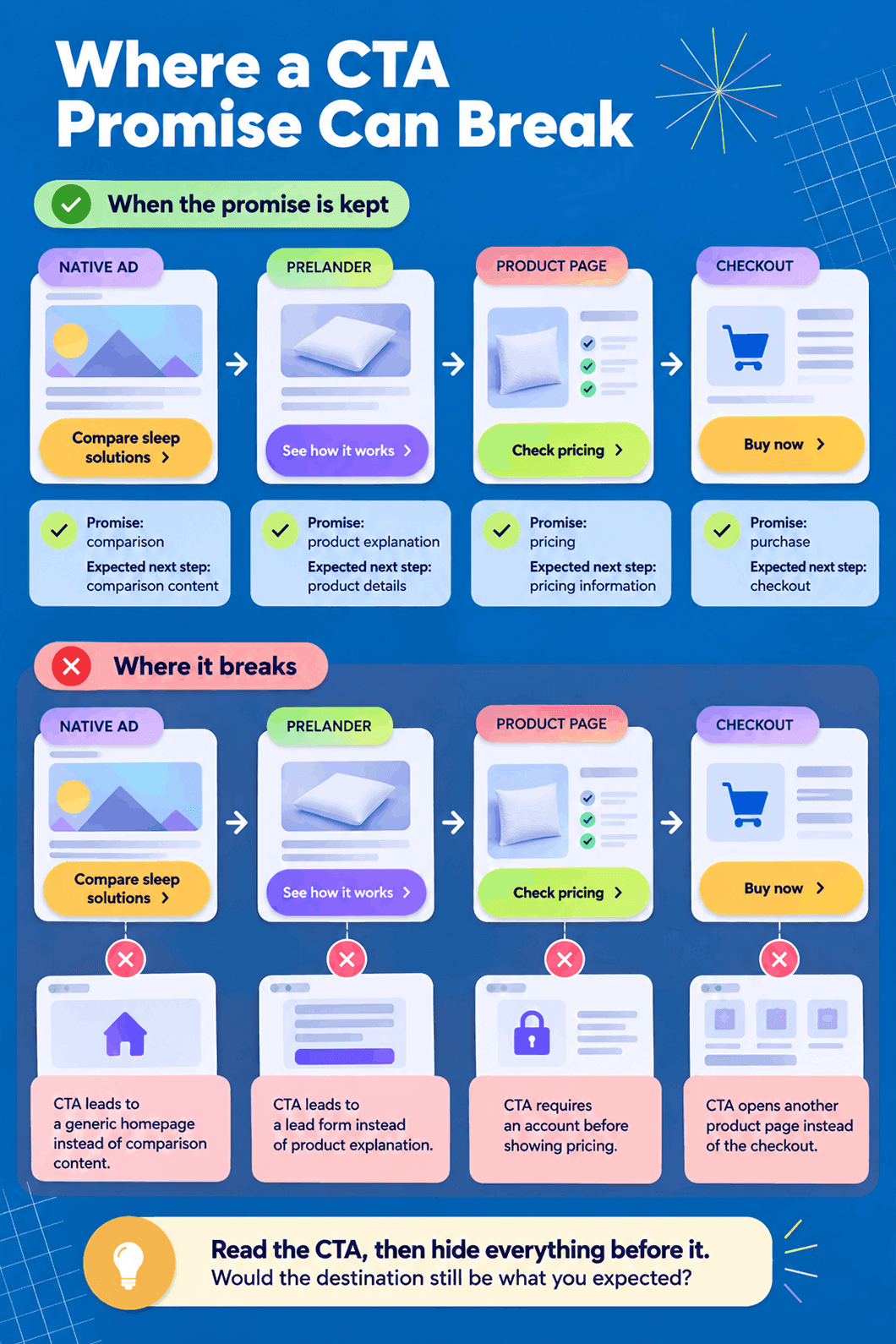
5. Make Sure the Destination Keeps the Promise
CTA copy sets an expectation before the click. The destination needs to fulfil it.
If the CTA says “Compare plans,” readers should arrive somewhere they can actually compare plans. If it says “Download the report,” they should not unexpectedly land on a generic product page. The same principle applies to landing page optimization: the experience after the click should follow naturally from the promise that earned it. For a native ad with an educational angle, that means continuing the story rather than suddenly switching to a hard sell.
A clear CTA can still create a poor experience when the page behind it delivers something different.
When Urgency Belongs in a CTA
Urgency works when there is a real reason to act within a certain timeframe. A registration deadline, expiring discount, limited booking window or confirmed stock constraint gives readers useful information for making a decision.
Without that reason, phrases such as “Hurry!”, “Act now!” or “Don’t miss out!” manufacture pressure without telling the reader anything useful.
Compare:
❌ Hurry! Get yours before it’s gone!
✅ Order by October 20 for 20% off
❌ Limited time only!
✅ Registration closes October 20 at 6 PM UTC
The specific version tells readers what changes and when. Any deadline, discount, availability claim or other condition mentioned around the CTA should also match the actual offer.
For the same reason, “Start free trial” only works when a free trial is genuinely available under the stated conditions. Offers can vary by market, eligibility and time, so CTA copy should reflect the conditions a particular reader will actually encounter.
How to Test CTA Copy
A CTA test is most useful when it starts with a specific question. Instead of changing the wording, color and placement at once, isolate one copy change and decide in advance what outcome would make it worth keeping.
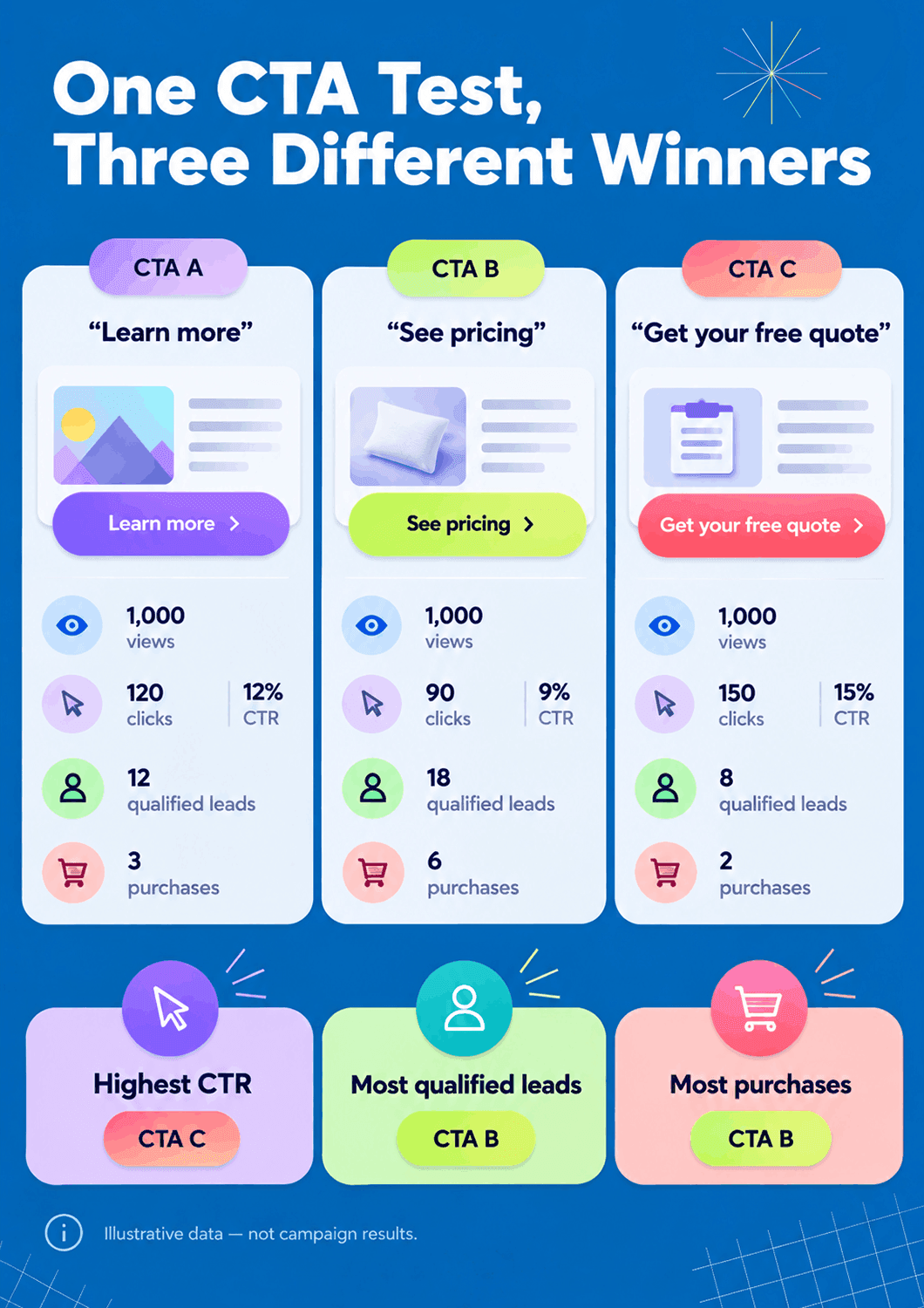
For example, suppose “Learn more” is replaced with “Compare plans.” More button clicks would be interesting, but they would not tell the whole story. The new wording could attract more clicks while producing the same number — or even fewer — qualified leads or purchases.
Use a simple worksheet before launching the test:
| Test field | Example |
|---|---|
| Hypothesis | Naming the destination will make the next step clearer |
| One copy change | “Learn more” → “Compare plans” |
| Audience | First-time visitors viewing the product page |
| Primary outcome | Completed signups after viewing the comparison |
| Guardrail | Purchase rate should not decline |
Button clicks can still help diagnose what happened, but treat them as an intermediate metric. This is where post-click thinking becomes especially useful: a CTA that attracts more clicks and fewer qualified leads may simply be setting the wrong expectation.
When testing CTA changes, keep the rest of the experience as stable as possible. Changing several elements at once makes it much harder to tell what caused the difference. For a broader look at campaign experiments and optimization, see our campaign testing strategies.
CTA Checklist Before You Publish
A final check can catch problems that are easy to miss when you are focused on finding the right words. Run through these six questions before the CTA goes live.
If one of these questions is difficult to answer, take another look at the CTA before publishing. Naming the destination, clarifying an offer condition or adjusting the level of commitment can often make the next step much clearer.
Real Call to Action Examples and Why They Work
A CTA rarely works in isolation. The headline, offer details and supporting copy around it can do much of the explaining, leaving the CTA itself short and direct. These current examples show several ways those pieces can work together.
Glossier: Let the Supporting Copy Do Some of the Work
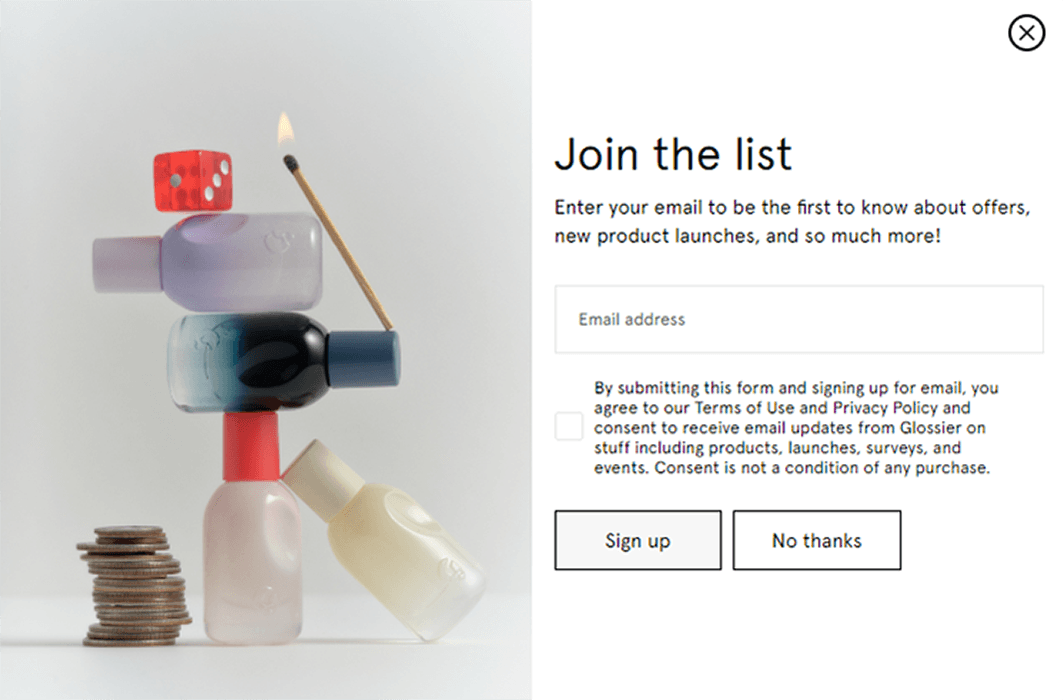
Glossier keeps the CTA itself simple: “Sign up.” The surrounding copy does the heavier lifting, explaining that subscribers will hear about offers and new product launches, while the consent text spells out what signing up means.
This is a useful reminder that every detail does not need to fit inside the button. When the context already makes the value and next step clear, a straightforward CTA can be enough.
Netflix: Give a Generic CTA Enough Context
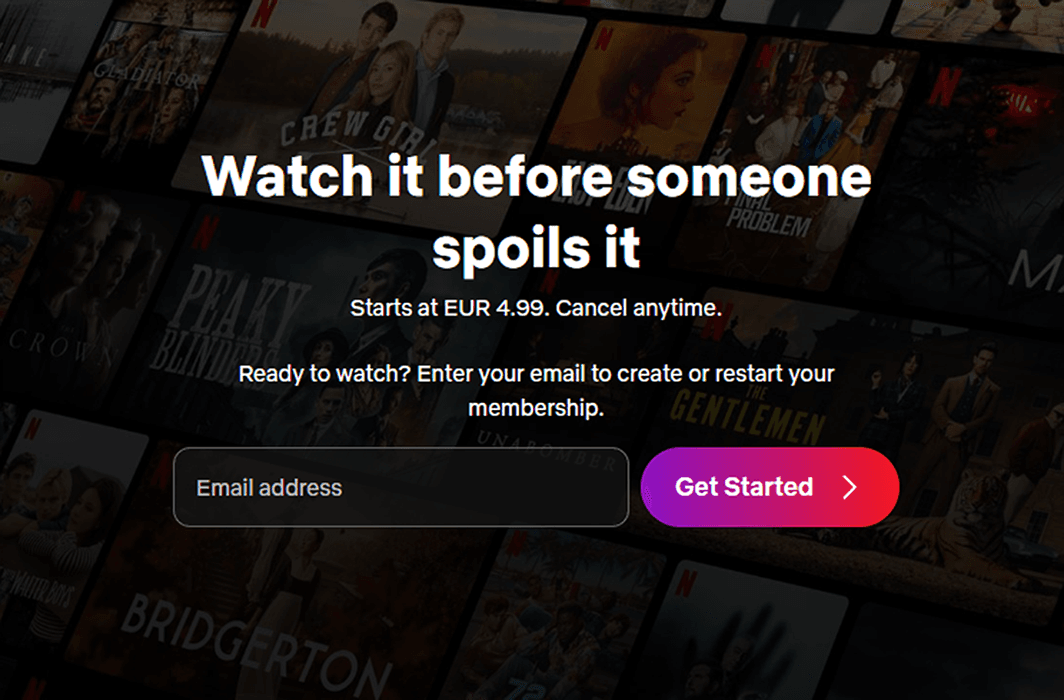
By the time the reader reaches the button, the surrounding copy has answered the important question: started with what? This is a good example of why CTA wording should be judged together with the message immediately around it.
Shopify: Put the Offer and Its Conditions Together
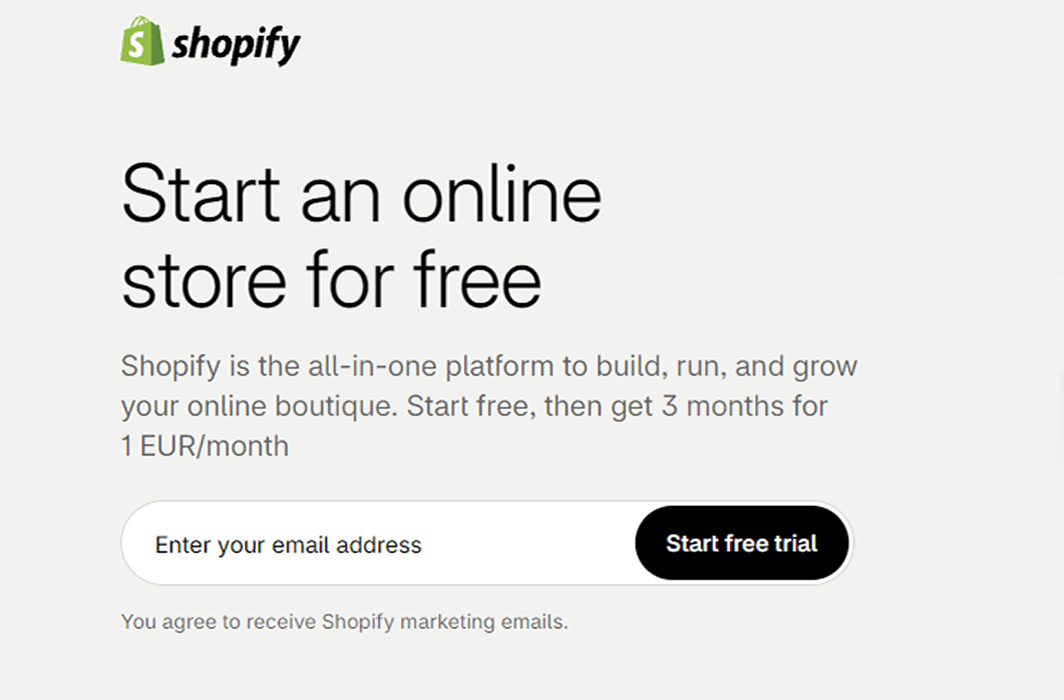
That combination matters whenever a CTA contains words such as “free,” “trial” or “save.” The attractive part of the offer can stay prominent without leaving its conditions hidden or ambiguous.
Canva: Continue the Message Into the CTA
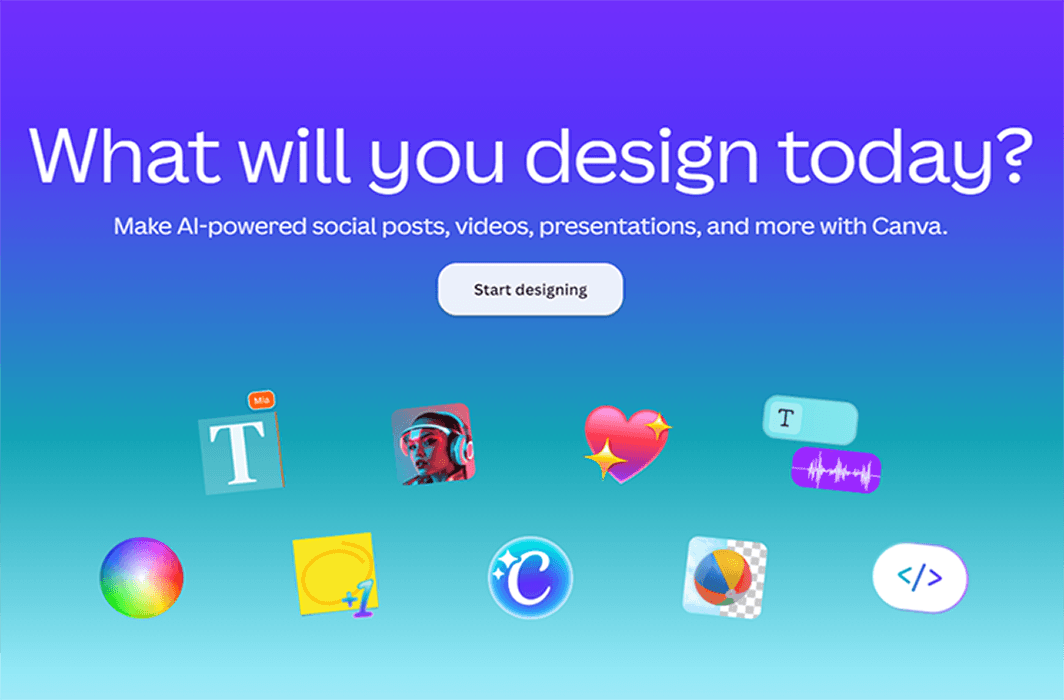
Canva asks “What will you design today?” and follows it with “Start designing.” The CTA feels like a direct continuation of the headline rather than a separate instruction added at the end of the page.
This is message match at its simplest: the page introduces an action, explains what the product can help create and then gives the reader a button for doing exactly that.
Victoria’s Secret: Give Urgency Something Concrete to Mean
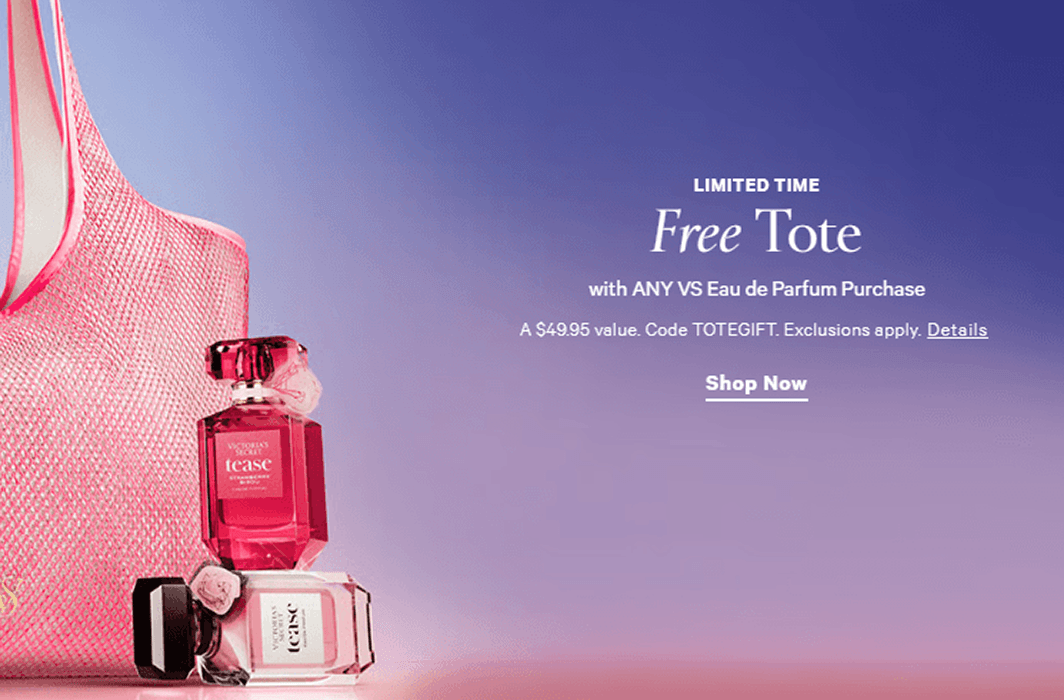
Victoria’s Secret labels its free-tote promotion “Limited Time,” but the urgency is supported by a specific offer. The page identifies the qualifying purchase, states the gift value, provides the promotional code and links to exclusions and further details.
The CTA itself can therefore stay simple: “Shop Now.” The reason to act comes from the actual promotion around it rather than pressure added to the button copy.
FAQ on Call to Action
What is a call to action?
A call to action (CTA) is a prompt that tells someone what they can do next. Examples include “See pricing,” “Download the report,” “Request a quote” and “Add to cart.” A CTA can appear in a button, link, banner, email, ad or other format.
What are some good call-to-action examples?
Good CTA examples depend on what the reader is ready to do. For someone exploring, “See how it works” may fit. During comparison, “Compare plans” or “View pricing” gives a clearer next step. “Request a quote” suits an enquiry, while “Add to cart” or “Buy now” makes sense when the reader is ready to purchase.
What makes a good CTA?
A good CTA makes the next action easy to understand and matches the reader’s intent. It should accurately describe what happens after the click, work with the surrounding copy and lead to a destination that delivers what was promised.
Is “Learn more” a bad CTA?
Not necessarily. “Learn more” can work when the surrounding context makes the destination obvious. When more specific wording is available, however, it can give readers a better reason to click. “Compare plans,” “See the results” or “Explore the features” tells them more about what comes next.
How long should a CTA be?
There is no universal word count for a CTA. Keep it short enough to scan quickly while preserving the information readers need. “Compare plans and pricing” may be more useful than the shorter “Compare” because it explains what the reader will find.
Can you use more than one CTA on a page?
Yes. A long page can repeat the same primary CTA at relevant points so readers do not have to search for it. You can also have secondary actions when they serve a clear purpose, but the page should make the primary next step easy to identify.
Where should a CTA be placed?
Place a CTA where readers have enough context to understand and consider the action. That might be near the top of a high-intent product page, after an important explanation or comparison, or at the end of an article. Longer pages may benefit from repeating the primary CTA as readers move through the content.
How do you measure CTA performance?
CTA clicks are useful, but they only show that someone took the first step. Measure the downstream outcome that matters for the campaign as well, such as qualified leads, completed signups, booked consultations or purchases. A CTA that earns more clicks does not automatically produce better business results.
From the Right Words to the Right Next Step
A strong CTA starts with a simple question: what makes sense for this reader to do next? Early in the journey, that might be more information. During comparison, it could be pricing or proof. Once the decision is made, the next step should make completing the purchase easy.
The wording should make that next step easy to understand, while the surrounding copy covers any conditions readers need to know. The destination then needs to follow through on the same promise.
For native campaigns, that consistency matters across the whole journey — from the ad and prelander to the offer itself. With MGID, advertisers can build, test and optimize that journey while keeping the experience connected from the first impression through to the action that matters.